LocateAnything
zm_config.json + model.weights.h5).
Load with from_weights("zeromodels/<variant>").
LocateAnything-3B is NVIDIA's visual-grounding VLM: a native-resolution MoonViT vision tower and a small connector feed a Qwen2.5-3B decoder, and the model answers in boxes and points rather than prose. One checkpoint covers a whole family of grounding tasks, chosen entirely by the instruction you give it: detection, multi-object referring, pointing, layout grounding, GUI/text grounding, and OCR.
Coordinates come out as quantized [0, 1000] tokens, not spelled-out digits, and the
model uses Parallel Box Decoding (PBD) to emit a whole box in a couple of steps
instead of one digit at a time. Divide a coordinate by 1000 and multiply by the image
width or height to get pixels.
Model card: nvidia/LocateAnything-3B
API
| Class | What it is |
|---|---|
LocateAnythingConditionalGenerate |
the full model with the tied LM head and generate. This is the one you want. |
LocateAnythingModel |
backbone only (no LM head). |
LocateAnythingVisionModel |
the MoonViT tower alone. |
LocateAnythingProcessor |
image + text to model inputs. |
LocateAnythingTokenizer |
Qwen2.5 BPE extended with the grounding tokens, plus parse_grounding. |
LocateAnythingImageProcessor |
the native-resolution MoonViT patch preprocessor. |
from_weights("zeromodels/locateanything_3b") loads any of them. The 3B decoder is large; load it in
bf16 (load_dtype="bfloat16") unless you have the memory for fp32.
Running a task
Pass task (and text) to the processor: it builds the instruction, and
post_process_generation turns the answer into structured results. The task drives both
ends, so you never hand-build a prompt or pick a parser.
inputs = processor(images=image, task="detection", text="zebra")
ids = model.generate(**inputs, max_new_tokens=192, tokenizer=processor.tokenizer)

result = processor.post_process_generation(
    ids, task="detection", image_size=image.size, text="zebra"
)
# {"task": "detection", "objects": [{"label": "zebra", "box": [x1, y1, x2, y2]}, ...]}   # box in pixels
- task: one of
detection,referring,phrase_grounding,pointing,layout,text_grounding,ocr. - text: the category or phrase (a list is joined with
</c>); ignored byocr. - post_process_generation returns
{"task", "objects": [...]}; each object is{"label", "box": [x1, y1, x2, y2]}or{"label", "point": [x, y]}. Passimage_size=(width, height)for pixels, or omit it to keep the[0, 1000]grid.textfills thelabelfor tasks that name their target in the prompt (detection, pointing); a<ref>-labeled task (referring, OCR, layout, text grounding) keeps the model's own label.
Pass a conversation=[...] instead of task for a custom or multi-turn prompt.
Shared Setup
Every task below reuses one loaded model and processor, and the same run helper. It
returns the parsed objects in the [0, 1000] grid (pass image_size to
post_process_generation for pixels):
import os

os.environ["KERAS_BACKEND"] = "torch"  # or "jax" / "tensorflow"

from PIL import Image, ImageDraw
from zeromodels.models.locateanything import (
    LocateAnythingConditionalGenerate,
    LocateAnythingProcessor,
)

model = LocateAnythingConditionalGenerate.from_weights(
    "zeromodels/locateanything_3b", load_dtype="bfloat16"
)
processor = LocateAnythingProcessor.from_weights("zeromodels/locateanything_3b")


def run(task, image, text="", **gen):
    inputs = processor(images=image, task=task, text=text)
    ids = model.generate(
        **inputs, max_new_tokens=192, tokenizer=processor.tokenizer, **gen
    )
    # objects: {"label": str | None, "box": [x1, y1, x2, y2]} or {"label", "point": [x, y]}
    return processor.post_process_generation(ids, task=task, text=text or None)[
        "objects"
    ]
Detection
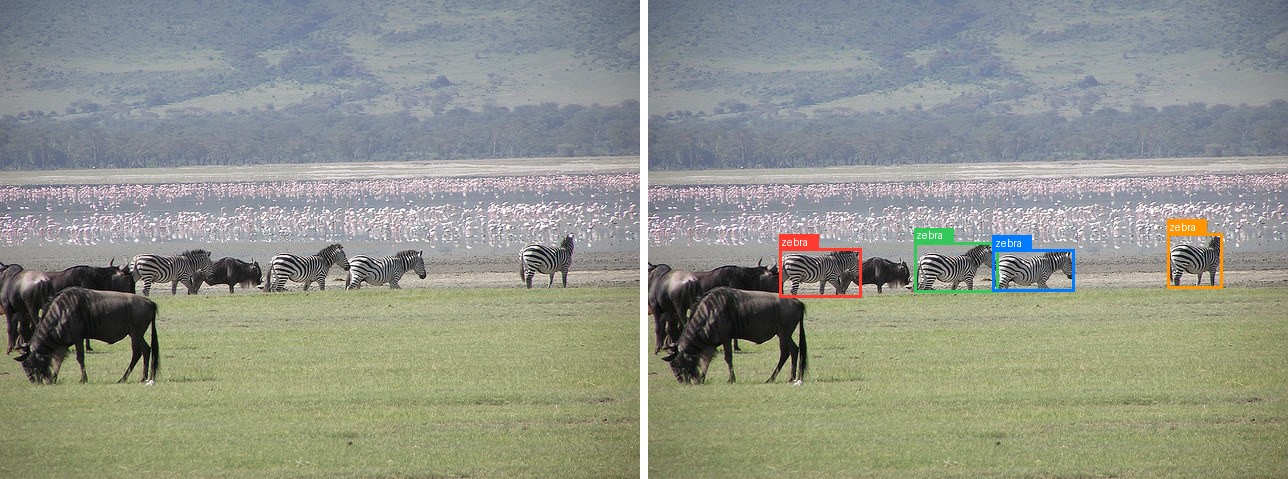
Give a category and get every instance of it. The answer is a flat list of boxes.
image = Image.open("assets/data/coco_herd_field.jpg").convert("RGB")
objects = run("detection", image, "zebra")

print(len(objects), objects[0])
Four zebras, each box in the [0, 1000] grid, and the wildebeest in the same frame are
left out. Pass a list of categories to detect several at once,
run("detection", image, ["zebra", "wildebeest"]).
Multi-Object Referring
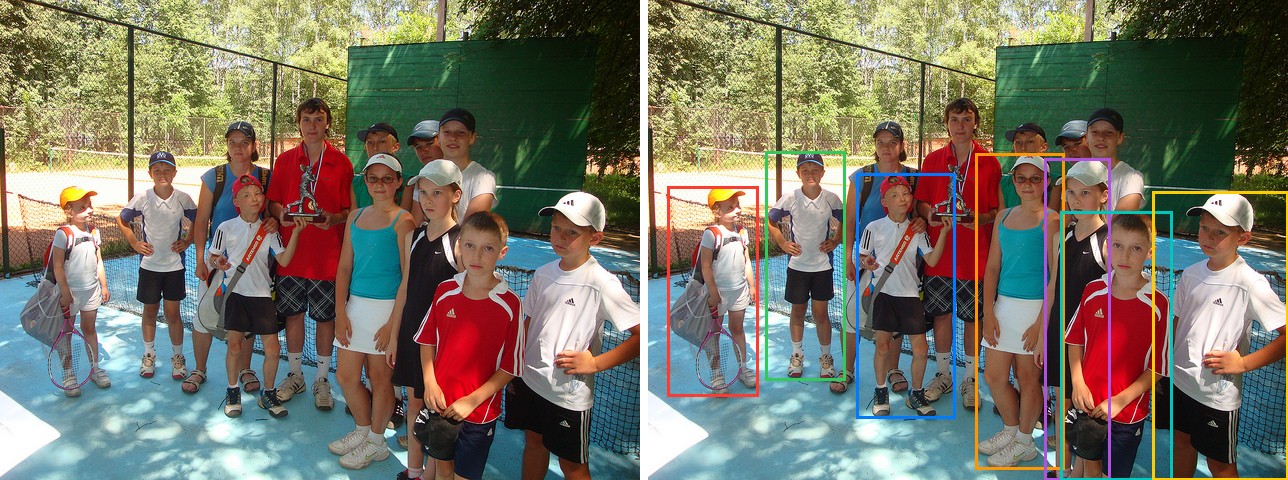
Referring returns every instance that matches a phrase, each paired with its label. The phrase can describe the instances rather than name a category, which is what separates it from plain detection.
image = Image.open("assets/data/coco_children_pool.jpg").convert("RGB")
objects = run("referring", image, "a child wearing a cap")

for obj in objects:
    print(obj["label"], obj["box"])
a child wearing a cap [31, 388, 173, 827]
a child wearing a cap [184, 315, 309, 792]
a child wearing a cap [325, 362, 481, 871]
a child wearing a cap [512, 319, 650, 979]
a child wearing a cap [619, 331, 723, 1000]
a child wearing a cap [645, 440, 819, 1000]
a child wearing a cap [788, 398, 1000, 1000]
Seven of the children come back and the bare-headed ones are skipped, out of a group of
more than a dozen. Use phrase_grounding instead when you want a single best instance
rather than all of them.
Pointing
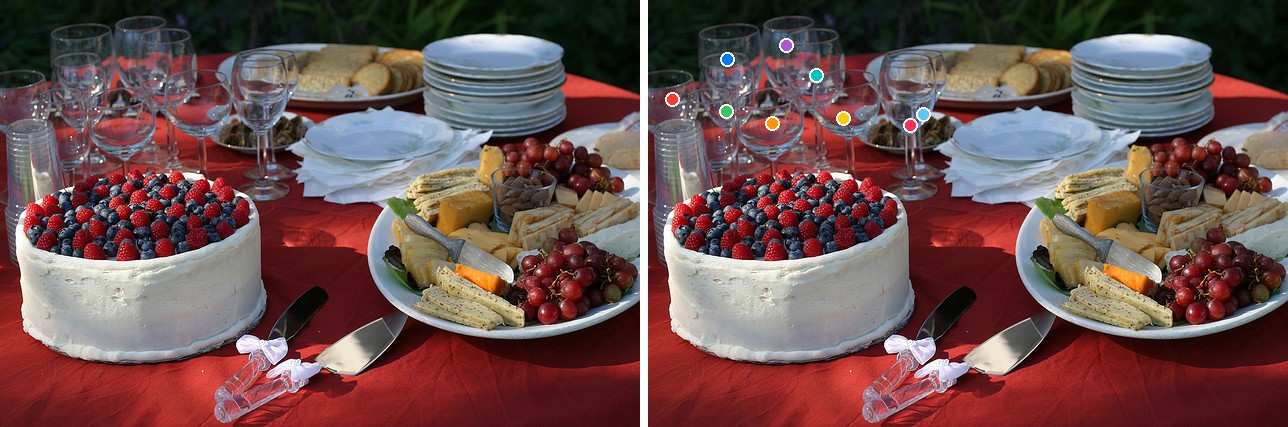
Pointing returns coordinates instead of boxes: a <box> carrying two numbers rather than
four, so each object has a point instead of a box.
image = Image.open("assets/data/coco_buffet.jpg").convert("RGB")
objects = run("pointing", image, "a wine glass")

print(len(objects), objects[0])
Nine glasses, one point each, in the [0, 1000] grid, picked out of a crowded table
without touching the cake, plates, or platter. Pointing scales to counts that would be
tedious to box: "a strawberry on the cake" on the same image returns 47 points.
Layout Grounding
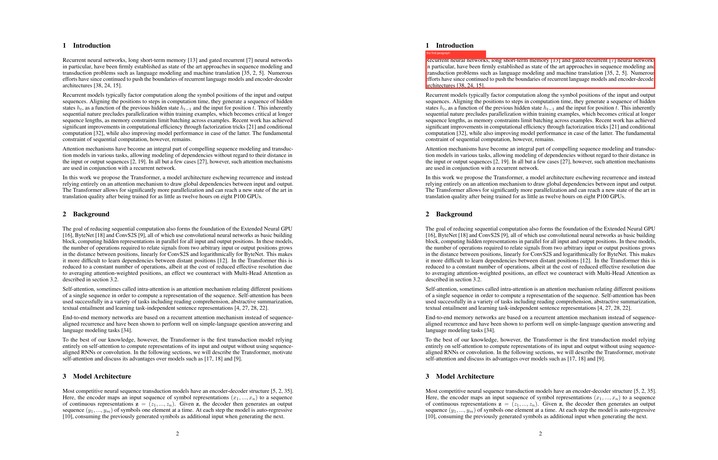
Layout grounding locates the single region that matches a description, which is what you use to pick a block out of a document page, a caption, a paragraph, a section. Here it finds the first paragraph on the second page of Attention Is All You Need.
image = Image.open("assets/data/attention_paper_p2.jpg").convert("RGB")
objects = run("layout", image, "the first paragraph")

print(objects)
Name a section instead, "the Background section", and it returns the tight box around
that heading ([176, 460, 309, 474]) rather than the whole block.
GUI / Text Grounding
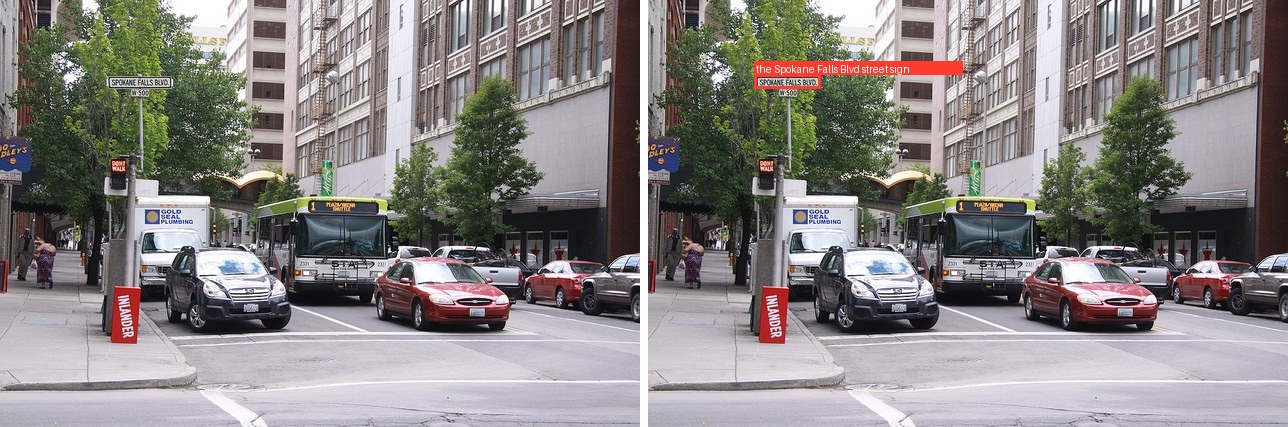
text_grounding locates a named piece of text or a named UI element, which is how GUI
grounding ("select the crop tool") works: point the same call at a screenshot and name
the control.
image = Image.open("assets/data/coco_city_bus.jpg").convert("RGB")
objects = run("text_grounding", image, "the Spokane Falls Blvd street sign")

print(objects)
It picks the one named sign out of a street full of text. Asking for "the DON'T WALK
sign" instead returns [167, 364, 200, 406], the signal head below it.
OCR
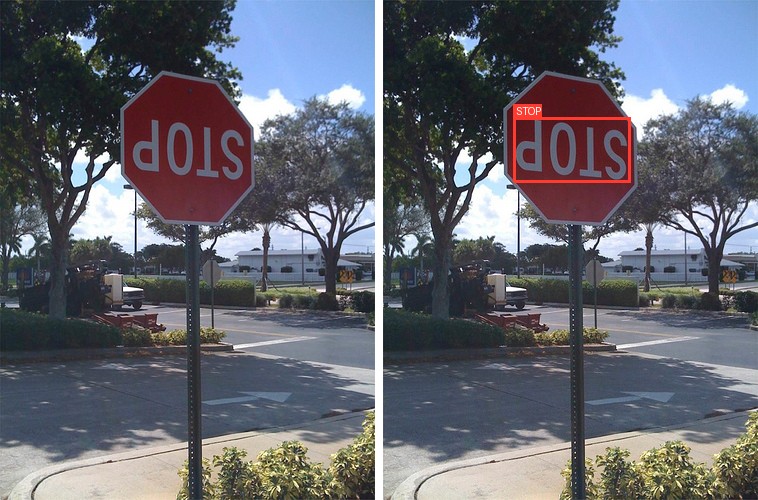
OCR detects every piece of text and returns each string with its box. The prompt takes no argument.
image = Image.open("assets/data/coco_stop_sign.jpg").convert("RGB")
objects = run("ocr", image)

for obj in objects:
    print(repr(obj["label"]), obj["box"])
The sign is mounted upside down and the model still reads it, returning the one text region in the frame with its box. On a scene with more signage it returns one entry per piece of text the same way.
Drawing the Results
The figures above overlay the parsed boxes and points on the original. The box variant:
def draw(image, objects):
    out = image.convert("RGB").copy()
    d, (w, h) = ImageDraw.Draw(out), out.size
    for obj in objects:  # objects come back in the [0, 1000] grid
        if "point" in obj:
            x, y = obj["point"][0] / 1000 * w, obj["point"][1] / 1000 * h
            d.ellipse([x - 6, y - 6, x + 6, y + 6], fill=(255, 59, 48))
        else:
            x1, y1, x2, y2 = obj["box"]
            box_px = [x1 / 1000 * w, y1 / 1000 * h, x2 / 1000 * w, y2 / 1000 * h]
            d.rectangle(box_px, outline=(255, 59, 48), width=3)
            if obj.get("label"):
                d.text((box_px[0], box_px[1] - 12), obj["label"])
    return out


draw(image, run("detection", image, "zebra")).save("assets/locate_result.jpg")
Decoding Modes
LocateAnything emits coordinates as quantized [0, 1000] tokens and can decode a box in
parallel (PBD) instead of one token at a time. generate exposes three modes through
generation_mode:
| Mode | What it does |
|---|---|
"hybrid" (default) |
multi-token box prediction with an autoregressive fallback; the fastest that stays faithful. |
"fast" |
multi-token prediction only. Fewest steps, occasionally coarser. |
"slow" |
pure autoregressive. The reference behaviour, one token per step. |
The run helper from the shared setup forwards any extra keyword to generate:
image = Image.open("assets/data/coco_herd_field.jpg").convert("RGB")
objects = run("detection", image, "zebra", generation_mode="fast")
The vision tower runs once and is cached across the decoding steps, so the per-box cost is
dominated by the decoder, which is what the parallel modes cut. The modes trade steps for
fidelity, so keep the default hybrid unless you have measured that fast is good enough
for your inputs.
Several Images
Because MoonViT keeps every image at its native resolution, the cleanest way to process several images is to loop, one grounding call each, which also lets each image carry a different task:
jobs = [
    ("detection", "coco_herd_field.jpg", "zebra"),
    ("pointing", "coco_buffet.jpg", "a wine glass"),
]
for task, name, text in jobs:
    objects = run(task, Image.open(f"assets/data/{name}").convert("RGB"), text)
    print(name, objects)
coco_herd_field.jpg [{'label': 'zebra', 'box': [205, 519, 333, 621]}, ...]
coco_buffet.jpg [{'label': 'a wine glass', 'point': [38, 234]}, ...]
LocateAnything is a grounding specialist, not a chat model. Its decoder is trained to emit boxes and points, and free-form questions come back garbled. Keep the prompts to the grounding tasks above; for general vision-language chat use a model built for it, such as Qwen3-VL.
Lower Memory
The 3B decoder loads in bf16 or weight-only quantized. See quantization.md:
model = LocateAnythingConditionalGenerate.from_weights(
    "zeromodels/locateanything_3b",
    quantization="int8",
    load_dtype="bfloat16",
)
Data Format
Coordinates are always returned in the [0, 1000] grid, independent of
keras.config.image_data_format(). The MoonViT tower keeps each image at its native
resolution (up to in_token_limit patches), so images of different sizes batch without
padding to a common shape.
See also kimi_k25.md, which shares the MoonViT vision tower.