Table Transformer
zm_config.json, zm_preprocessor.json, and
model.weights.h5). Load with
from_weights("zeromodels/table-transformer-detection"); the architecture is read
from the repo config, so no shape arguments are needed.
Table Transformer (TATR) applies the DETR detection recipe to tables. It is the same end-to-end set-prediction model: a ResNet backbone produces a feature map, a transformer encoder-decoder attends over it with a fixed set of learned object queries, and each query emits one class and one box, with no anchors and no non-maximum suppression. It ships in two tasks, both the same architecture with a different query count and label set:
- Table detection finds tables in a page image (classes: table, table rotated).
- Table-structure recognition decomposes a cropped table into its cells (classes: table, column, row, column header, projected row header, spanning cell).
Two details separate it from DETR: the encoder and decoder layers are pre-normalized (the LayerNorm sits before each attention / feed-forward sub-layer) with an extra final encoder LayerNorm, and the backbone is a ResNet-18 (so the 1x1 input projection reduces 512 channels rather than 2048).
Paper: PubTables-1M: Towards comprehensive table extraction from unstructured documents
API
TableTransformerDetect
TableTransformerDetect(
    hidden_dim=256,
    num_heads=8,
    num_encoder_layers=6,
    num_decoder_layers=6,
    dim_feedforward=2048,
    dropout_rate=0.1,
    num_queries=15,
    num_classes=3,
    image_size=800,
    input_tensor=None,
    name="TableTransformerDetect",
)
The detection model: backbone, transformer, and the class and box heads. This one class
serves both tasks; only num_queries and num_classes differ between the checkpoints, and
from_weights fills them in from the repo config.
Parameters
- hidden_dim (
int, optional, defaults to256): transformer width, thed_modelof the HF config. - num_heads (
int, optional, defaults to8): attention heads. - num_encoder_layers (
int, optional, defaults to6): encoder depth. - num_decoder_layers (
int, optional, defaults to6): decoder depth. - dim_feedforward (
int, optional, defaults to2048): FFN inner dimension. - dropout_rate (
float, optional, defaults to0.1): dropout, active only during training. - num_queries (
int, optional, defaults to15): learned object queries, the hard ceiling on detections per image. Detection uses 15, structure recognition 125. - num_classes (
int, optional, defaults to3): object classes plus the "no object" class (detection: 2 + 1; structure: 6 + 1). - image_size (
int, optional, defaults to800): input resolution the model is built for. - input_tensor (
dict, optional): pre-existing input tensor to build on. - name (
str, optional, defaults to"TableTransformerDetect"): model name.
Call model(pixel_values, training=False). Returns a dict:
- logits (
(B, num_queries, num_classes)): per-query class logits. - pred_boxes (
(B, num_queries, 4)): normalized(cx, cy, w, h)in[0, 1].
Raw output is one prediction per query, most of them the "no object" class. Run it through
post_process_object_detection to get scored, pixel-space boxes.
TableTransformerModel
TableTransformerModel(
    hidden_dim=256,
    num_heads=8,
    num_encoder_layers=6,
    num_decoder_layers=6,
    dim_feedforward=2048,
    dropout_rate=0.1,
    num_queries=15,
    image_size=800,
    input_tensor=None,
    name="TableTransformerModel",
)
The backbone and transformer without detection heads, ending at the decoder hidden states. Use it when you want Table Transformer features to attach your own head to.
Parameters are identical to TableTransformerDetect, minus
num_classes, and name defaults to "TableTransformerModel".
Returns the decoder's last hidden state, (B, num_queries, hidden_dim).
Preprocessing
TableTransformerImageProcessor
TableTransformerImageProcessor(
    size=None,
    resample="bilinear",
    do_rescale=True,
    rescale_factor=1 / 255,
    do_normalize=True,
    image_mean=None,
    image_std=None,
    return_tensor=True,
    data_format=None,
)
Resizes to a fixed square, rescales to [0, 1], and normalizes with ImageNet statistics
(the same preprocessing the Table Transformer checkpoints ship with).
Parameters
- size (
dict, optional, defaults to{"height": 800, "width": 800}): target size. - resample (
str, optional, defaults to"bilinear"): resize interpolation. - do_rescale (
bool, optional, defaults toTrue): scale pixels to[0, 1]. - rescale_factor (
float, optional, defaults to1/255): the rescaling factor. - do_normalize (
bool, optional, defaults toTrue): apply mean/std normalization. - image_mean (
tuple, optional, defaults to(0.485, 0.456, 0.406)): per-channel mean. - image_std (
tuple, optional, defaults to(0.229, 0.224, 0.225)): per-channel std. - return_tensor (
bool, optional, defaults toTrue): return backend tensors rather than numpy. - data_format (
str, optional):"channels_last"or"channels_first". Defaults tokeras.config.image_data_format().
Call processor(image) with a path, a PIL image, an array, or a list of any mix of
those. Returns a dict with pixel_values ((B, H, W, 3)).
post_process_object_detection
processor.post_process_object_detection(
    outputs, threshold=0.7, target_sizes=None, label_names=None
)
Softmaxes the logits, drops the "no object" class, keeps whatever clears threshold, and
converts boxes to pixel-space (x0, y0, x1, y1) scaled to target_sizes.
- outputs: the
dictreturned by the model. - threshold (
float, optional, defaults to0.7): minimum class probability. - target_sizes (
listof(height, width), optional): original image sizes, one per batch element. - label_names (
listofstr, optional): class names. Defaults to the six structure-recognition labels; passTABLE_DETECTION_LABELSfor the detection model.
Returns a list with one dict per image, each holding scores, labels,
label_names, and boxes ((x0, y0, x1, y1) in pixels).
The module also exports the two label tuples for convenience:
from zeromodels.models.table_transformer.table_transformer_image_processor import (
    TABLE_DETECTION_LABELS,  # ("table", "table rotated")
    TABLE_STRUCTURE_LABELS,  # ("table", "table column", "table row", ...)
)
Model Variants
All variants are ResNet-18 backboned. Load any of them with
TableTransformerDetect.from_weights("zeromodels/<variant>").
| Task | Repo | Queries | Classes |
|---|---|---|---|
| Table detection | zeromodels/table-transformer-detection |
15 | 2 + 1 |
| Structure recognition | zeromodels/table-transformer-structure-recognition |
125 | 6 + 1 |
| Structure v1.1 (all) | zeromodels/table-transformer-structure-recognition-v1.1-all |
125 | 6 + 1 |
| Structure v1.1 (fin) | zeromodels/table-transformer-structure-recognition-v1.1-fin |
125 | 6 + 1 |
| Structure v1.1 (pub) | zeromodels/table-transformer-structure-recognition-v1.1-pub |
125 | 6 + 1 |
Detection finds tables in a page image; the structure-recognition variants decompose a cropped table into its rows, columns, and header / spanning cells (the three v1.1 checkpoints differ only in their training corpus: all, financial, or publication tables).
Basic Usage: Table Detection
from PIL import Image
from zeromodels.models.table_transformer import (
    TableTransformerDetect,
    TableTransformerImageProcessor,
)
from zeromodels.models.table_transformer.table_transformer_image_processor import (
    TABLE_DETECTION_LABELS,
)

model = TableTransformerDetect.from_weights("zeromodels/table-transformer-detection")
processor = TableTransformerImageProcessor.from_weights(
    "zeromodels/table-transformer-detection"
)

image = Image.open("page.jpg").convert("RGB")
inputs = processor(image)

output = model(inputs["pixel_values"], training=False)
# output["logits"]:     (1, 15, 3)
# output["pred_boxes"]: (1, 15, 4)

results = processor.post_process_object_detection(
    output,
    threshold=0.9,
    target_sizes=[(image.height, image.width)],
    label_names=TABLE_DETECTION_LABELS,
)[0]

for score, name, box in sorted(
    zip(results["scores"], results["label_names"], results["boxes"]),
    key=lambda d: -float(d[0]),
):
    print(f"{name:14s} {float(score):.3f}  {[round(float(v)) for v in box]}")
Each kept detection is a table region in pixel coordinates. Crop the page to those boxes to get the table images for the next stage.
Table-Structure Recognition
Structure recognition takes a cropped table and predicts its structure (six classes:
rows, columns, the column header, projected row headers, and spanning cells), not one box per
cell. That is the difference from cell-detection models such as TableFormer: to get discrete
cells you intersect the predicted rows and columns (and keep each spanning cell whole).
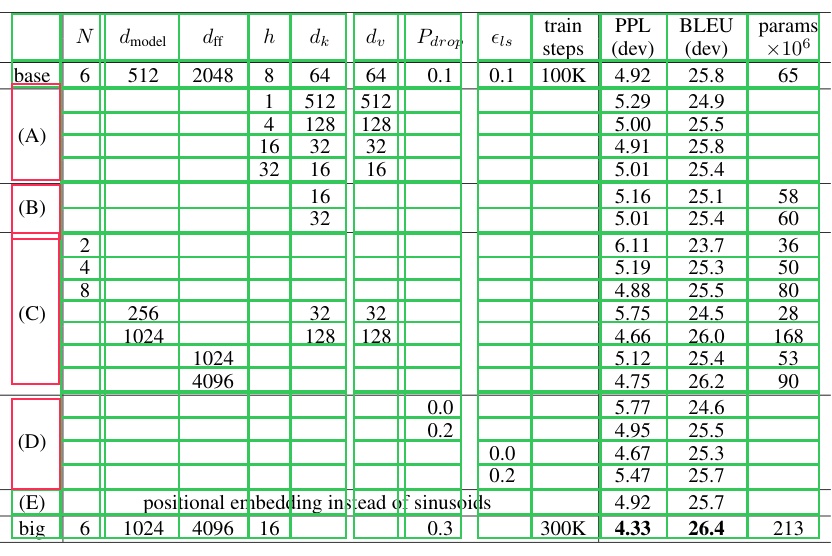
The tables below are the real Table 2 and Table 3 from Attention Is All You Need
(arXiv:1706.03762), cropped from the paper's PDF pages with the table-transformer-detection
checkpoint. Here the ablations table is decomposed into its cells (green), with the
A / B / C / D variation-group labels kept as single spanning cells (red):
from PIL import Image
from zeromodels.models.table_transformer import (
    TableTransformerDetect,
    TableTransformerImageProcessor,
)

model = TableTransformerDetect.from_weights(
    "zeromodels/table-transformer-structure-recognition-v1.1-all"
)
processor = TableTransformerImageProcessor.from_weights(
    "zeromodels/table-transformer-structure-recognition-v1.1-all"
)

table = Image.open("assets/data/attention_table3.png").convert("RGB")
output = model(processor(table)["pixel_values"], training=False)
# output["logits"]:     (1, 125, 7)   six structure classes + no-object
# output["pred_boxes"]: (1, 125, 4)

struct = processor.post_process_object_detection(
    output, threshold=0.6, target_sizes=[(table.height, table.width)]
)[0]


def structure_to_cells(struct):
    """One box per cell, from the predicted rows x columns (spanning cells kept whole)."""

    def kind(name):
        return [
            [float(v) for v in box]
            for box, n in zip(struct["boxes"], struct["label_names"])
            if n == name
        ]

    rows = sorted(kind("table row"), key=lambda b: b[1])
    cols = sorted(kind("table column"), key=lambda b: b[0])
    spans = kind("table spanning cell")

    def spanned(box):
        cx, cy = (box[0] + box[2]) / 2, (box[1] + box[3]) / 2
        return any(s[0] <= cx <= s[2] and s[1] <= cy <= s[3] for s in spans)

    grid = [[c[0], r[1], c[2], r[3]] for r in rows for c in cols]
    return [b for b in grid if not spanned(b)] + spans


cells = structure_to_cells(struct)
print(f"{len(cells)} cells")
The raw prediction has 13 table column, 21 table row, 1 table column header,
and 4 table spanning cell boxes (read them off struct["label_names"]). Intersecting the
13 columns with the 21 rows gives a 273-cell grid; dropping the 17 grid cells covered by the
four A / B / C / D spanning cells and adding those 4 spans back yields the 260 cells drawn
above. The column-header and spanning-cell classes then tell you which cells are headers or
span multiple rows / columns.
Batch of Multiple Tables
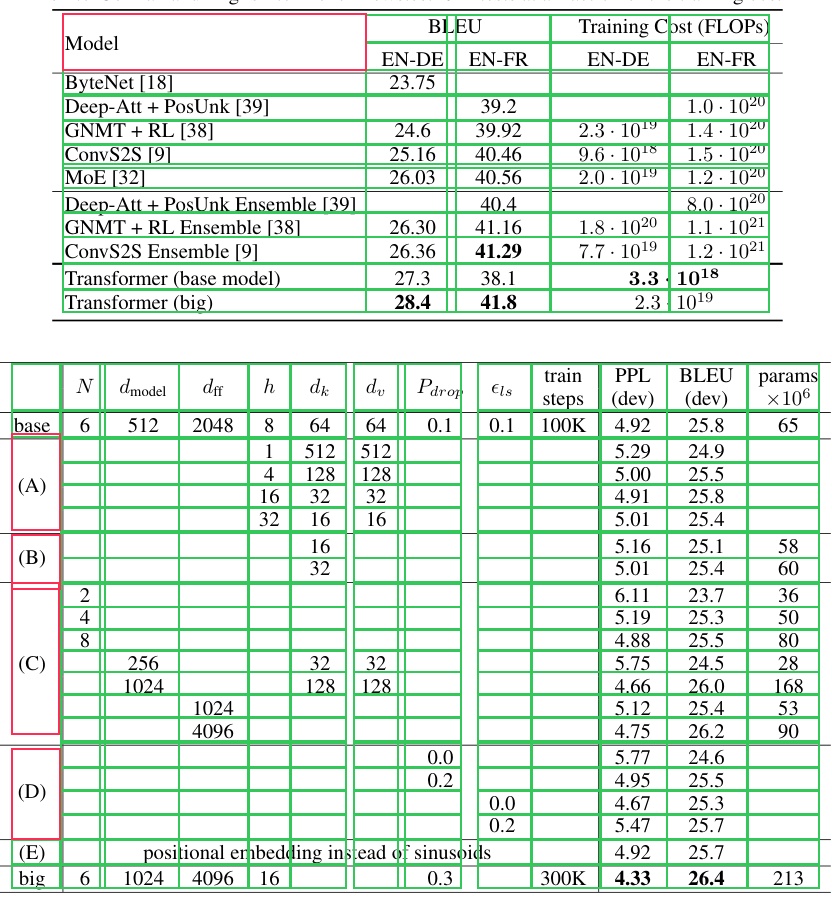
Pass a list of table crops and one target_sizes entry per image. Every image is resized to
the same square, so stacking is always safe and the batch result is identical to running the
images one at a time. Here the paper's results table (Table 2) and ablations table (Table 3)
are decomposed into cells together (reusing structure_to_cells from above):
from PIL import Image

paths = ["assets/data/attention_table2.png", "assets/data/attention_table3.png"]
images = [Image.open(p).convert("RGB") for p in paths]

inputs = processor(paths)  # (2, 800, 800, 3)
outputs = model(inputs["pixel_values"], training=False)

results = processor.post_process_object_detection(
    outputs, threshold=0.6, target_sizes=[(im.height, im.width) for im in images]
)
for path, struct in zip(paths, results):
    print(path, len(structure_to_cells(struct)), "cells")
The results table (5 x 12) and the ablations table (13 x 21) are decomposed together, and each image's cells match running it on its own.
Data Format
Both the model and the processor support channels_last and channels_first. They pick
the format differently:
| How it picks the format | |
|---|---|
| Processor | A data_format kwarg, per instance. None (the default) resolves to keras.config.image_data_format(). |
| Model | Reads keras.config.image_data_format() when it is constructed. There is no data_format argument. |
Set the global format before constructing the model, and both sides agree:
import keras

keras.config.set_image_data_format("channels_first")
model = TableTransformerDetect.from_weights("zeromodels/table-transformer-detection")
# now expects (B, 3, H, W)
Detections are identical under either layout; only the tensor shape changes. The
post-processor emits xyxy pixel boxes and class indices, which have no channel axis, so it
takes no data_format kwarg.
Loading Fine-tuned and Community Weights
The zeromodels/table-transformer-* repos above are pre-converted. Any other Hugging Face
repo whose model_type is "table-transformer" (the upstream microsoft/table-transformer-*
checkpoints, or a community fine-tune) loads with the hf: prefix, converting on the fly:
from zeromodels.models.table_transformer import TableTransformerDetect

model = TableTransformerDetect.from_weights("hf:<user>/my-table-transformer-finetune")

# Architecture only, randomly initialized
model = TableTransformerDetect.from_weights(
    "zeromodels/table-transformer-detection", load_weights=False
)
No shape arguments are needed. The architecture is read from the repo's config.json and
mapped onto the constructor: d_model, encoder_attention_heads, encoder_layers,
decoder_layers, encoder_ffn_dim, num_queries, and the label count. TableTransformerModel
loads the same way, warm-starting the backbone and transformer from the detector's weights.