Depth Anything V2
from_weights(...).
V2 changes nothing about V1's architecture: the same DINOv2 ViT backbone, the same DPT neck and head. What changed is the data. V1 learned from real labeled images, whose depth annotations are noisy around edges; V2 replaces them with synthetic images, whose labels are exact, and recovers real-world coverage through a much larger teacher pseudo-labeling 62 M unlabeled photos.
The payoff is boundary fidelity, plus metric heads that return actual metres rather than the relative inverse depth V1 is limited to.
Paper: Depth Anything V2
API
DepthAnythingV2DepthEstimation
DepthAnythingV2DepthEstimation(backbone_dim=384, backbone_depth=12,
                               backbone_num_heads=6, out_indices=None,
                               neck_hidden_sizes=None, fusion_hidden_size=64,
                               reassemble_factors=None,
                               depth_estimation_type="relative", max_depth=1.0,
                               image_size=518, input_tensor=None,
                               name="DepthAnythingV2DepthEstimation")
The DINOv2 backbone, DPT neck, and depth head. Subclasses the V1 estimator. This is the class for depth estimation.
Parameters
- backbone_dim (
int, optional, defaults to384): ViT width. Filled in byfrom_weightsfrom the variant config. - backbone_depth (
int, optional, defaults to12): transformer blocks, the main size lever from small to large. - backbone_num_heads (
int, optional, defaults to6): attention heads. - out_indices (
tuple, optional): block indices whose features feed the neck. - neck_hidden_sizes (
tuple, optional): per-scale reassemble widths. - fusion_hidden_size (
int, optional, defaults to64): DPT fusion width. - reassemble_factors (
tuple, optional): per-scale up/down sampling factors. - depth_estimation_type (
str, optional, defaults to"relative"):"relative"ends the head in aReLU;"metric"in asigmoidscaled bymax_depth. Set from the variant config. - max_depth (
float, optional, defaults to1.0): output ceiling for metric heads,20indoor or80outdoor. Unused when relative. - image_size (
intortuple, optional, defaults to518): input resolution the model is built for. - input_tensor (
dict, optional): pre-existing input tensors to build on. - name (
str, optional, defaults to"DepthAnythingV2DepthEstimation"): model name.
Call model(pixel_values, training=False). Returns a tensor of shape
(B, 518, 518, 1) under channels_last: per-pixel depth at the model's resolution.
DepthAnythingV2Model
DepthAnythingV2Model(backbone_dim=384, backbone_depth=12, backbone_num_heads=6,
                     out_indices=None, neck_hidden_sizes=None,
                     fusion_hidden_size=64, reassemble_factors=None,
                     image_size=518, input_tensor=None, name="DepthAnythingV2Model")
The backbone and DPT neck alone, without the head, returning the fused pyramid at quarter
resolution ((B, 296, 296, 64) for a 518 input). Use it as a feature extractor.
The backbone class has no entry on the release tag, so
DepthAnythingV2Model.from_weights("depth_anything_v2_small")raises"No release weights configured for variant": the release assets are exports of the full estimator. Load it overhf:, or read the layer you want offDepthAnythingV2DepthEstimation.
Preprocessing
DepthAnythingV2ImageProcessor
Stretches the image to a square target_size and normalizes with ImageNet statistics.
Parameters
- target_size (
int, optional, defaults to518): square side the image is resized to. Match the model'simage_size. - image_mean / image_std (
tuple, optional): defaults to the ImageNet statistics. - data_format (
str, optional):"channels_last"or"channels_first". Defaults tokeras.config.image_data_format().
processor(image) accepts a path, PIL image, or numpy array and returns a dict with
pixel_values (1, 518, 518, 3).
post_process_depth_estimation
Resamples the prediction back to original_size, given as (height, width), and
squeezes the channel axis. Returns a (H, W) depth tensor. For relative variants the
values are inverse depth; for metric variants they are metres.
Model Variants
Nine variants across two output types. Relative variants return unitless inverse depth;
metric variants return metres, bounded by max_depth.
| Variant id | Backbone | Output | max_depth |
|---|---|---|---|
depth_anything_v2_small |
ViT-S/14 | relative | n/a |
depth_anything_v2_base |
ViT-B/14 | relative | n/a |
depth_anything_v2_large |
ViT-L/14 | relative | n/a |
depth_anything_v2_metric_indoor_{small,base,large} |
ViT-S/B/L | metric, indoor | 20 m |
depth_anything_v2_metric_outdoor_{small,base,large} |
ViT-S/B/L | metric, outdoor | 80 m |
The metric heads are fine-tuned on Hypersim (indoor) and Virtual KITTI (outdoor), and are not interchangeable: an outdoor model on a living room will happily report tens of metres.
Basic Usage: Depth Estimation
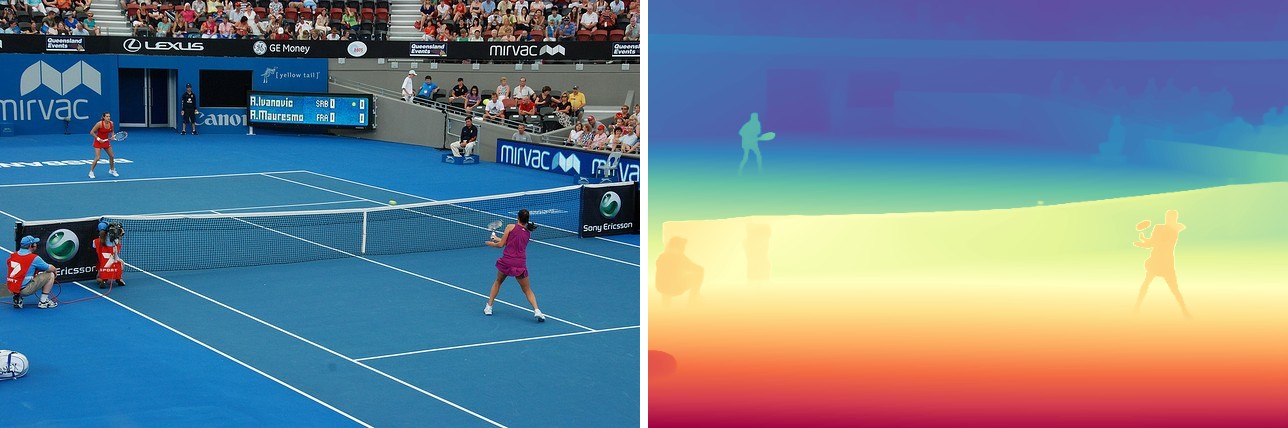
The original beside its predicted depth, coloured with Spectral_r over the map's own min
and max. The near player reads closest (red), the court recedes smoothly to the packed
stands (blue), and the net and far player stay crisp against the surface behind them.
import keras
import matplotlib
import numpy as np
import torch
from PIL import Image
from kerasformers.models.depth_anything_v2 import (
    DepthAnythingV2DepthEstimation, DepthAnythingV2ImageProcessor,
)

model = DepthAnythingV2DepthEstimation.from_weights("depth_anything_v2_large")
processor = DepthAnythingV2ImageProcessor()

image = Image.open("assets/data/coco_tennis.jpg").convert("RGB")

with torch.no_grad():
    output = model(processor(image)["pixel_values"], training=False)
# output: (1, 518, 518, 1)

depth = processor.post_process_depth_estimation(
    output, original_size=(image.height, image.width)
)
depth = np.squeeze(np.asarray(keras.ops.convert_to_numpy(depth)))
print(depth.shape, round(float(depth.min()), 2), round(float(depth.max()), 2))

# Visualize: per-image min-max normalize, then Spectral_r.
lo, hi = float(depth.min()), float(depth.max())
rgb = matplotlib.colormaps["Spectral_r"]((depth - lo) / (hi - lo + 1e-8))[..., :3]
Image.fromarray((rgb * 255).astype("uint8")).save("assets/depth.jpg")
The value range carries no unit: bigger means closer, and the numbers are only comparable within this one image. Do not compare them across images, and use a metric variant if you need real distances.
Use
torch.no_grad()on the torch backend. The large variant at 518x518 is a ViT-L, and autograd will hold every intermediate for a forward pass you never differentiate.
Batch Processing Multiple Images
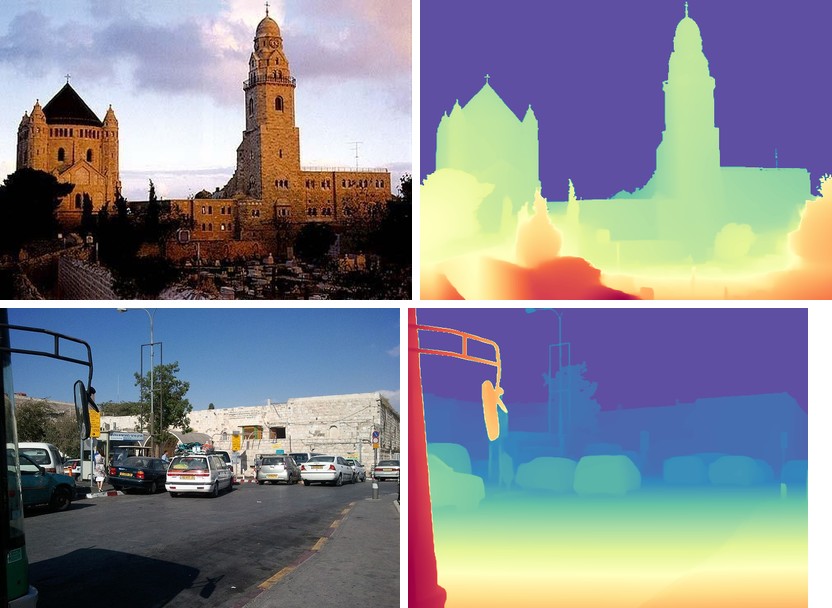
Every image is stretched to the same 518 square, so a batch is just stacked
pixel_values. Post-process each map on its own, since the originals differ in size:
import keras
import numpy as np
import torch
from PIL import Image
from kerasformers.models.depth_anything_v2 import (
    DepthAnythingV2DepthEstimation, DepthAnythingV2ImageProcessor,
)

model = DepthAnythingV2DepthEstimation.from_weights("depth_anything_v2_large")
processor = DepthAnythingV2ImageProcessor()

paths = ["assets/data/ade_val_2.jpg", "assets/data/coco_parking.jpg"]
images = [Image.open(p).convert("RGB") for p in paths]

pixel_values = np.concatenate(
    [np.asarray(keras.ops.convert_to_numpy(processor(p)["pixel_values"])) for p in paths],
    axis=0,
)   # (2, 518, 518, 3)
with torch.no_grad():
    output = model(pixel_values, training=False)   # (2, 518, 518, 1)

for path, image, logits in zip(paths, images, output):
    depth = processor.post_process_depth_estimation(
        logits[None], original_size=(image.height, image.width)
    )
    depth = np.squeeze(np.asarray(keras.ops.convert_to_numpy(depth)))
    print(f"{path}: {depth.shape}  [{depth.min():.2f}, {depth.max():.2f}]")
assets/data/ade_val_2.jpg: (364, 500)  [0.00, 365.61]
assets/data/coco_parking.jpg: (480, 640)  [0.00, 557.88]
What V2 Buys Over V1

Original, then depth_anything_large, then
depth_anything_v2_large. Both read the scene correctly, and V1 is not wrong anywhere in
particular. What V2 buys is edge fidelity: the phone in the subject's hands, the gap
between her arm and body, and the individual ribs of the bridge arch all survive in V2
and smear in V1. Swapping versions is a two-line import change; the processor and
post-processing are identical.
Metric Depth

An indoor scene with the indoor head, then a street with the outdoor head. Here the colormap runs over the head's absolute range rather than per image, so blue is near and red is far, the reverse of the relative figures above.
import keras
import numpy as np
import torch
from PIL import Image
from kerasformers.models.depth_anything_v2 import (
    DepthAnythingV2DepthEstimation, DepthAnythingV2ImageProcessor,
)

model = DepthAnythingV2DepthEstimation.from_weights(
    "depth_anything_v2_metric_indoor_large"
)
processor = DepthAnythingV2ImageProcessor()

image = Image.open("assets/data/coco_living_room.jpg").convert("RGB")
with torch.no_grad():
    output = model(processor(image)["pixel_values"], training=False)

depth = processor.post_process_depth_estimation(
    output, original_size=(image.height, image.width)
)
depth = np.squeeze(np.asarray(keras.ops.convert_to_numpy(depth)))
print(f"{depth.min():.2f} m to {depth.max():.2f} m, median {np.median(depth):.2f} m")

# Colour on the absolute scale (max_depth) so two images stay comparable.
normalized = np.clip(depth / 20.0, 0.0, 1.0)      # 80.0 for the outdoor head
The outdoor head on the street scene gives 3.27 m to 76.64 m, median 17.33 m. Both sit
inside their bounds (20 m and 80 m), and both are plausible for the scene, which is the
cheapest sanity check available: a metric model pinned at its ceiling is telling you the
scene is out of its training domain.
Feature Extraction
DepthAnythingV2Model stops after the DPT neck, for attaching your own head:
from kerasformers.models.depth_anything_v2 import DepthAnythingV2Model

backbone = DepthAnythingV2Model.from_weights(
    "hf:depth-anything/Depth-Anything-V2-Small-hf"
)
features = backbone(processor(image)["pixel_values"], training=False)
# features: (1, 296, 296, 64)
Input Resolution
The default is 518x518, the DINOv2 pretraining size. Other sizes work as long as both sides are multiples of the patch size, 14: the checkpoint's position embeddings are bilinearly interpolated to the requested patch grid at load time, so the pretrained weights stay valid.
# 392 / 14 = 28 x 28 patches
model = DepthAnythingV2DepthEstimation.from_weights(
    "depth_anything_v2_small", image_size=392
)

# Non-square, 28 x 56 patches
model = DepthAnythingV2DepthEstimation.from_weights(
    "depth_anything_v2_small", image_size=(392, 784)
)
Pass the matching target_size to the processor. Larger inputs recover more fine
structure at quadratic attention cost.
Resizing works on the release path, not
hf:. The interpolation lives inViTAddPositionEmbs.load_own_variables, which the Keras.weights.h5reader calls; thehf:converter assigns the checkpoint tensor straight into the variable and so requires an exact match. Asking for a non-default size overhf:fails withUnsupported layer type or shape mismatch for backbone_pos_embed/pos_embed.
Data Format
Both the model and the processor support channels_last and channels_first.
| How it picks the format | |
|---|---|
| Processors | A data_format kwarg, per instance. None (the default) resolves to keras.config.image_data_format(). |
| Models | Read keras.config.image_data_format() when they are constructed. There is no data_format argument. |
import keras

keras.config.set_image_data_format("channels_first")

model = DepthAnythingV2DepthEstimation.from_weights("depth_anything_v2_large")
processor = DepthAnythingV2ImageProcessor()
# model input: (B, 3, 518, 518), output: (B, 1, 518, 518)
post_process_depth_estimation also takes data_format, and always returns (H, W).
Loading Fine-tuned and Community Weights
Any Hugging Face repo whose model_type is "depth_anything" loads with the hf:
prefix.
from kerasformers.models.depth_anything_v2 import DepthAnythingV2DepthEstimation

model = DepthAnythingV2DepthEstimation.from_weights(
    "hf:depth-anything/Depth-Anything-V2-Large-hf"
)
model = DepthAnythingV2DepthEstimation.from_weights("hf:<user>/depth-anything-finetuned")

# Architecture only, randomly initialized
model = DepthAnythingV2DepthEstimation.from_weights(
    "depth_anything_v2_small", load_weights=False
)
See also Depth Anything V1, the original release this retrains.