DINO
from_weights(...).
DINO is self-supervised: it trains a ViT with no labels, by matching the outputs of a student and a teacher network across different crops of the same image. The surprise in the paper was that the resulting features are semantic for free. The [CLS] token's attention lands on objects, and the patch features cluster into parts, without a single annotation.
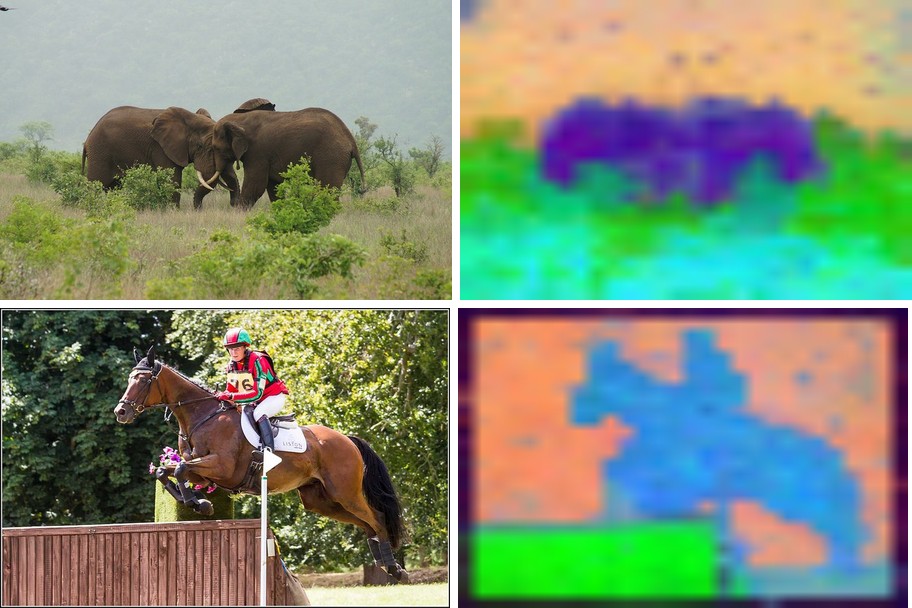
These are backbones, not task models. They take an image and return features; what you do with them, classification, segmentation, retrieval, is up to a head you add. The figures below make the learned structure visible by running PCA on the patch features and mapping the top three components to RGB.
Paper: Emerging Properties in Self-Supervised Vision Transformers
API
DinoViTModel
DinoViTModel(as_backbone=False, patch_size=16, embed_dim=384, depth=12,
             num_heads=6, mlp_ratio=4.0, qkv_bias=True, qk_norm=False,
             drop_rate=0.0, attn_drop_rate=0.0, include_normalization=True,
             normalization_mode="imagenet", image_size=224,
             input_tensor=None, name="DinoViTModel")
The DINO Vision Transformer. This is the main backbone class.
Parameters
- as_backbone (
bool, optional, defaults toFalse): return a list of intermediate feature maps (embedding + one per block) instead of the final token sequence. - patch_size (
int, optional, defaults to16): pixels per patch.8for the*8variants. Filled in byfrom_weights. - embed_dim / depth / num_heads (
int, optional): transformer width, blocks, and heads. Set from the variant config. - mlp_ratio / qkv_bias / qk_norm / drop_rate / attn_drop_rate: standard ViT block knobs.
- include_normalization (
bool, optional, defaults toTrue): normalize inside the model, so you feed raw[0, 255]pixels. - normalization_mode (
str, optional, defaults to"imagenet"): which mean/std to use when normalizing. - image_size (
intortuple, optional, defaults to224): input resolution the model is built for. - input_tensor (
dict, optional): pre-existing input tensors to build on. - name (
str, optional, defaults to"DinoViTModel"): model name.
Call model(pixel_values, training=False) with raw [0, 255] pixels. Returns the
token sequence (B, 1 + num_patches, embed_dim), the leading token being [CLS]. With
as_backbone=True, a list of depth + 1 such tensors.
DinoResNetModel
DinoResNetModel(as_backbone=False, depths=None, filters=None,
                include_normalization=True, normalization_mode="imagenet",
                image_size=224, input_tensor=None, name="DinoResNetModel")
The DINO ResNet-50 backbone, for a convolutional alternative. Returns the final
(B, 7, 7, 2048) feature map under channels_last, or with as_backbone=True the four
stage maps ((B, 56, 56, 256) through (B, 7, 7, 2048)).
Preprocessing
There is no separate image processor. Both models carry include_normalization=True, so
feed raw [0, 255] pixels (resized to the model's image_size) and normalization
happens inside. Pass include_normalization=False if you have already normalized.
Model Variants
| Variant id | Backbone | Patch | Params |
|---|---|---|---|
dino_vits16 |
ViT-S | 16 | ~21 M |
dino_vits8 |
ViT-S | 8 | ~21 M |
dino_vitb16 |
ViT-B | 16 | ~85 M |
dino_vitb8 |
ViT-B | 8 | ~85 M |
dino_resnet50 |
ResNet-50 | n/a | ~23 M |
The *8 variants use an 8-pixel patch, so four times as many tokens and a much finer
feature map, at a higher compute cost.
Basic Usage: Feature Extraction
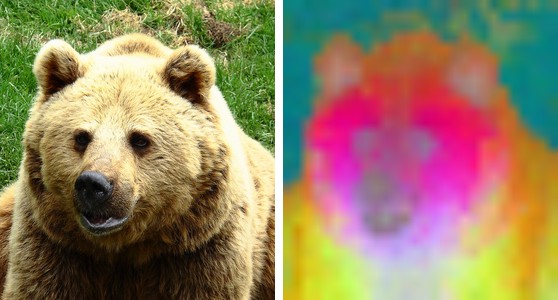
Run the backbone, drop the [CLS] token, and PCA the patch features to three components
for an RGB view of what the model sees. The bear's head and body separate cleanly from
the grass, with no supervision anywhere in the pipeline.
import keras
import numpy as np
import torch
from PIL import Image
from kerasformers.models.dino import DinoViTModel

size, patch = 448, 16
model = DinoViTModel.from_weights("dino_vits16", image_size=size)

image = Image.open("assets/data/coco_bear.jpg").convert("RGB")
x = np.asarray(image.resize((size, size)))[None].astype("float32")   # raw [0, 255]

with torch.no_grad():
    tokens = model(x, training=False)
tokens = np.asarray(keras.ops.convert_to_numpy(tokens))[0]
print(tokens.shape)   # (1 + num_patches, embed_dim)

# PCA the patch tokens (drop the CLS token) to RGB.
grid = size // patch
patches = tokens[1:].reshape(grid * grid, -1).astype("float64")
patches -= patches.mean(0, keepdims=True)
proj = patches @ np.linalg.svd(patches, full_matrices=False)[2][:3].T
proj = proj.reshape(grid, grid, 3)
lo, hi = proj.min((0, 1)), proj.max((0, 1))
proj = (proj - lo) / (hi - lo + 1e-8)

vis = Image.fromarray((proj * 255).astype("uint8")).resize(image.size, Image.BILINEAR)
vis.save("assets/dino_pca.jpg")
785 = 1 + 28 * 28: one [CLS] token plus a 28x28 patch grid at 448/16. The [CLS]
token, tokens[0], is the image-level embedding you would feed a classification head; the
patches are the dense features the PCA above visualizes.
Use
torch.no_grad()on the torch backend. These are pure forward passes; autograd would retain every intermediate for nothing.
Batch Processing Multiple Images
Stack images that share a size into one batch:
import keras
import numpy as np
import torch
from PIL import Image
from kerasformers.models.dino import DinoViTModel

size = 448
model = DinoViTModel.from_weights("dino_vits16", image_size=size)

paths = ["assets/data/coco_elephants.jpg", "assets/data/coco_horse_jump.jpg"]
batch = np.stack(
    [np.asarray(Image.open(p).convert("RGB").resize((size, size)), "float32")
     for p in paths]
)   # (2, 448, 448, 3)

with torch.no_grad():
    tokens = model(batch, training=False)
print(np.asarray(keras.ops.convert_to_numpy(tokens)).shape)   # (2, 785, 384)
Each row of the figure is an image beside its own feature PCA: the elephants separate from the scrub, the horse and rider from the trees behind.
Intermediate Features
as_backbone=True returns the embedding plus one feature map per block, for feeding a
DPT-style neck or an FPN:
model = DinoViTModel.from_weights("dino_vits16", as_backbone=True, image_size=size)
features = model(x, training=False)   # x from above, at 448
print(len(features), features[-1].shape)   # 13  (1, 785, 384)
DinoResNetModel(as_backbone=True) gives the four convolutional stage maps instead.
Data Format
The ViT works in token space, so it is layout-agnostic. DinoResNetModel reads
keras.config.image_data_format() when it is constructed and returns
channels_last (B, 7, 7, 2048) or channels_first (B, 2048, 7, 7) accordingly.
import keras
keras.config.set_image_data_format("channels_first")
model = DinoResNetModel.from_weights("dino_resnet50")   # output (B, 2048, 7, 7)
Input Resolution
Any size that is a multiple of the patch size works: the learned position embeddings
are bilinearly interpolated to the requested patch grid at load time, so the pretrained
weights stay valid. The figures here use image_size=448 for a finer map than the
default 224 gives.
Loading Fine-tuned and Community Weights
Any Hugging Face repo whose model_type is "vit" in the DINO layout loads with the
hf: prefix.
from kerasformers.models.dino import DinoViTModel

model = DinoViTModel.from_weights("hf:facebook/dino-vits16")
model = DinoViTModel.from_weights("hf:<user>/dino-finetuned")

# Architecture only, randomly initialized
model = DinoViTModel.from_weights("dino_vits16", load_weights=False)
See also DINOv2, which adds register-free dense features and layer scale, and DINOv3, which adds register tokens and rotary position embeddings.