D-FINE
from_weights(...).
D-FINE is a real-time detector built on the RT-DETR recipe: an HGNetV2 backbone, a hybrid encoder that mixes attention-based intra-scale interaction (AIFI) with cross-scale feature merging (CCFM), and a deformable decoder with 300 queries. Like RT-DETR it is NMS-free, so one forward pass is the whole pipeline.
Its contribution is how boxes are regressed. Rather than predicting four coordinates directly, D-FINE reformulates regression as Fine-grained Distribution Refinement: each decoder layer predicts a distribution over discrete offset bins and accumulates refinements across layers. A Localization Quality Estimation head then folds box-distribution confidence back into the classification score.
Paper: D-FINE: Redefine Regression Task of DETRs as Fine-grained Distribution Refinement
API
DFineDetect
DFineDetect(stem_channels=(3, 16, 16), stage_in_channels=(16, 64, 256, 512),
            stage_mid_channels=(16, 32, 64, 128),
            stage_out_channels=(64, 256, 512, 1024), stage_num_blocks=(1, 1, 2, 1),
            stage_numb_of_layers=(3, 3, 3, 3), use_lab=True,
            encoder_in_channels=(256, 512, 1024), encoder_hidden_dim=256,
            encoder_ffn_dim=1024, encode_proj_layers=(2,), hidden_expansion=1.0,
            ccfm_num_blocks=1, hidden_dim=256, decoder_num_layers=6,
            decoder_ffn_dim=1024, decoder_n_points=None, num_feature_levels=3,
            feat_strides=(8, 16, 32), num_classes=80, num_queries=300,
            image_size=640, input_tensor=None, name="DFineDetect")
The detector: backbone, hybrid encoder, and the distribution-refinement decoder. This is the class for object detection.
Most parameters are architecture dimensions that from_weights fills in from the
variant config, so you rarely set them by hand. The ones worth knowing:
- num_classes (
int, optional, defaults to80): COCO's 80 categories. D-FINE has no background class, unlike DETR's 92. - num_queries (
int, optional, defaults to300): decoder queries, the ceiling on detections per image. - image_size (
int, optional, defaults to640): input resolution the model is built for. Must be a multiple of 32, see Input Resolution. - decoder_num_layers (
int, optional, defaults to6): decoder depth. 3 for nano and small, 4 for medium, 6 for large and xlarge. - hidden_dim (
int, optional, defaults to256): decoder width.128for nano. - stage_out_channels (
tuple, optional): HGNetV2 stage widths, the main size lever across variants. - feat_strides (
tuple, optional, defaults to(8, 16, 32)): strides of the three feature levels. - num_feature_levels (
int, optional, defaults to3): multi-scale levels fed to the decoder. - use_lab (
bool, optional, defaults toTrue): Learnable Affine Blocks in the backbone, used by the smaller variants. - input_tensor (
dict, optional): pre-existing input tensors to build on. - name (
str, optional, defaults to"DFineDetect"): model name.
Call model(pixel_values, training=False). Returns a dict:
- logits (
(B, num_queries, num_classes)): per-query class logits, sigmoid-activated downstream. - pred_boxes (
(B, num_queries, 4)): normalized(cx, cy, w, h)in[0, 1].
DFineModel
The backbone and encoder without detection heads. Parameters match
DFineDetect, minus num_classes, with name defaulting to
"DFineModel". Use it for features to attach your own head to.
Preprocessing
DFineImageProcessor
DFineImageProcessor(size=None, resample="bilinear", do_rescale=True,
                    rescale_factor=1/255, do_normalize=False, image_mean=None,
                    image_std=None, return_tensor=True, data_format=None)
Resizes to a fixed square and rescales to [0, 1].
Parameters
- size (
dict, optional, defaults to{"height": 640, "width": 640}): target size. - resample (
str, optional, defaults to"bilinear"): resize interpolation. - do_rescale (
bool, optional, defaults toTrue): scale pixels to[0, 1]. - rescale_factor (
float, optional, defaults to1/255): the rescaling factor. - do_normalize (
bool, optional, defaults toFalse): see the note below. - image_mean / image_std (
tuple, optional): normalization statistics, unused whiledo_normalizeisFalse. - return_tensor (
bool, optional, defaults toTrue): return backend tensors rather than numpy. - data_format (
str, optional):"channels_last"or"channels_first". Defaults tokeras.config.image_data_format().
do_normalizedefaults toFalsehere, and that is correct. D-FINE inherits RT-DETR's recipe and was trained on rescaled[0, 1]input with no ImageNet normalization, matchingustc-community/dfine-*upstream. DETR and RF-DETR default toTrue. Setting it toTruehere silently degrades detection quality.
Call processor(image) with a path, a PIL image, an array, or a list of any
mix of those. Returns a dict:
- pixel_values (
(B, H, W, 3)): preprocessed images, in the configured data format.
post_process_object_detection
processor.post_process_object_detection(outputs, threshold=0.5, target_sizes=None,
                                        num_top_queries=300, label_names=None)
Applies sigmoid (not softmax, since there is no background class), takes the top
scoring query/class pairs, converts boxes to pixel (x0, y0, x1, y1), and filters by
threshold. Omitting target_sizes leaves boxes normalized.
Returns a list with one dict per image, holding scores, labels,
label_names, and boxes.
Model Variants
| Variant id | Backbone | Decoder layers | Params | HF original |
|---|---|---|---|---|
dfine-nano |
HGNetV2-Nano | 3 | 6 M | ustc-community/dfine-nano-coco |
dfine-small |
HGNetV2-Small | 3 | 11 M | ustc-community/dfine-small-coco |
dfine-medium |
HGNetV2-Medium | 4 | 20 M | ustc-community/dfine-medium-coco |
dfine-large |
HGNetV2-Large | 6 | 32 M | ustc-community/dfine-large-coco |
dfine-xlarge |
HGNetV2-XLarge | 6 | 63 M | ustc-community/dfine-xlarge-coco |
All are 640×640 COCO models. dfine-nano also narrows hidden_dim to 128.
Basic Usage: Object Detection
from PIL import Image
from kerasformers.models.dfine import DFineDetect, DFineImageProcessor

model = DFineDetect.from_weights("dfine-nano")
processor = DFineImageProcessor()

image = Image.open("assets/data/coco_buffet.jpg").convert("RGB")
inputs = processor(image)

output = model(inputs["pixel_values"], training=False)
# output["logits"]:     (1, 300, 80)
# output["pred_boxes"]: (1, 300, 4)

results = processor.post_process_object_detection(
    output, threshold=0.5, target_sizes=[(image.height, image.width)]
)[0]

# Queries come back in the model's own order, so sort by score for readability.
detections = sorted(
    zip(results["scores"], results["label_names"], results["boxes"]),
    key=lambda d: -float(d[0]),
)
for score, name, box in detections:
    print(f"{name:14s} {float(score):.3f}  {[round(float(v)) for v in box]}")
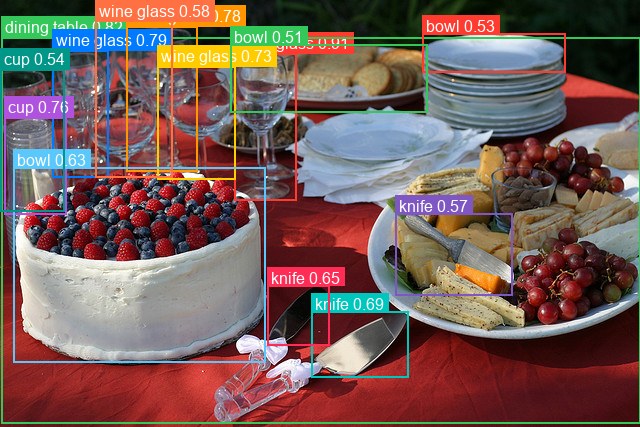
wine glass     0.905  [234, 53, 296, 200]
dining table   0.817  [1, 37, 640, 423]
wine glass     0.794  [52, 50, 108, 177]
wine glass     0.778  [126, 26, 197, 171]
cup            0.763  [4, 117, 66, 214]
wine glass     0.734  [157, 66, 235, 179]
knife          0.690  [311, 311, 408, 377]
knife          0.651  [267, 285, 329, 345]
bowl           0.629  [13, 167, 265, 362]
wine glass     0.577  [95, 18, 172, 177]
knife          0.569  [395, 213, 512, 295]
cup            0.544  [0, 69, 64, 211]
bowl           0.532  [422, 33, 565, 72]
bowl           0.505  [230, 44, 427, 112]
The 0.5 threshold suits D-FINE's sigmoid scores. It is a lower bar than DETR's 0.9
because these scores are not softmax-normalized against a background class.
Batch Processing Multiple Images
Pass a list of images and one target_sizes entry per image:
from PIL import Image
from kerasformers.models.dfine import DFineDetect, DFineImageProcessor

model = DFineDetect.from_weights("dfine-nano")
processor = DFineImageProcessor()

paths = ["assets/data/coco_food_bowl.jpg", "assets/data/coco_kitchen.jpg"]
images = [Image.open(p).convert("RGB") for p in paths]

inputs = processor(paths)                                  # (2, 640, 640, 3)
output = model(inputs["pixel_values"], training=False)

results = processor.post_process_object_detection(
    output, threshold=0.5,
    target_sizes=[(im.height, im.width) for im in images],
)

for path, result in zip(paths, results):
    print(f"\n{path}")
    detections = sorted(
        zip(result["scores"], result["label_names"], result["boxes"]),
        key=lambda d: -float(d[0]),
    )
    for score, name, box in detections:
        print(f"  {name:12s} {float(score):.3f}  {[round(float(v)) for v in box]}")
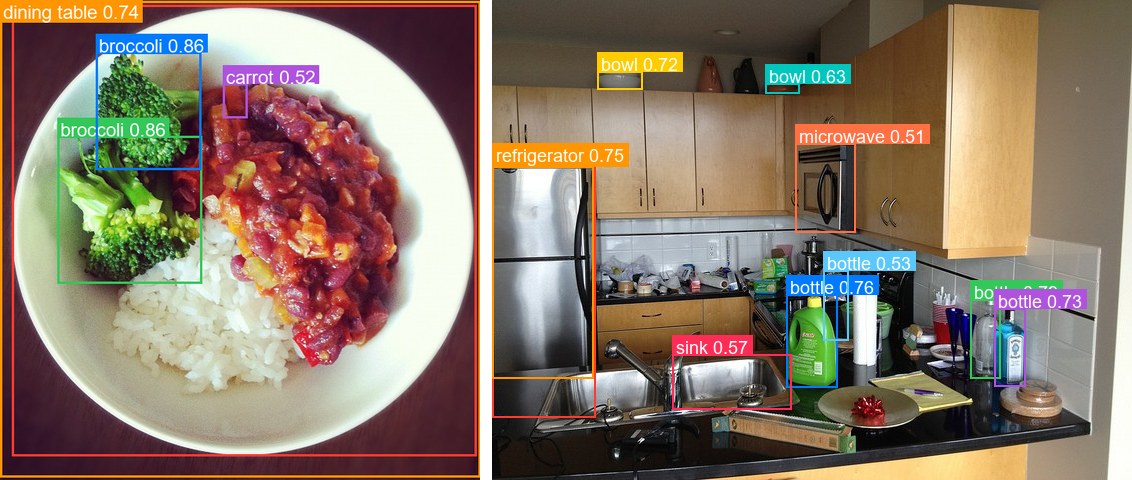
assets/data/coco_food_bowl.jpg
  bowl         0.867  [15, 6, 607, 581]
  broccoli     0.857  [73, 173, 257, 361]
  broccoli     0.857  [122, 66, 256, 216]
  dining table 0.737  [0, 1, 612, 608]
  carrot       0.518  [284, 106, 315, 150]

assets/data/coco_kitchen.jpg
  refrigerator 0.803  [0, 166, 103, 417]
  bottle       0.791  [478, 299, 508, 378]
  bottle       0.762  [294, 294, 345, 387]
  refrigerator 0.753  [0, 166, 101, 378]
  bottle       0.733  [502, 308, 533, 386]
  bowl         0.720  [105, 71, 150, 89]
  bowl         0.632  [273, 83, 307, 93]
  sink         0.569  [180, 354, 299, 409]
  bottle       0.526  [331, 270, 356, 340]
  microwave    0.506  [303, 143, 363, 232]
Every image is resized to the same square, so stacking is always safe. Batch results are identical to running the images one at a time.
Input Resolution
D-FINE is Functional, so the input shape is fixed when the model is constructed. To run at another resolution, build at that size and match the processor:
model = DFineDetect.from_weights("dfine-nano", image_size=512)
processor = DFineImageProcessor(size={"height": 512, "width": 512})
The side must be a multiple of 32. The three feature levels use strides 8, 16, and 32 and the encoder fuses them together, so a side like 600 yields mismatched maps and raises during the reshape.
Pretrained weights load at any valid size: position encodings are computed sine functions rather than a learned grid, so nothing is tied to the training resolution. Quality still peaks near the native 640:
320:  tv 0.726, keyboard 0.725, laptop 0.571          <- degrades sharply
480:  laptop 0.928, mouse 0.918, tv 0.896, keyboard 0.790
512:  laptop 0.955, keyboard 0.945, mouse 0.924, tv 0.907
640:  laptop 0.951, keyboard 0.944, tv 0.926, mouse 0.918   <- native
800:  tv 0.918, laptop 0.886, keyboard 0.881, mouse 0.845
480 to 800 is the comfortable band. At 320 the model starts missing objects outright.
Custom Class Names
A model fine-tuned on your own dataset predicts your class indices, not COCO's. Pass
the names so label_names reads correctly:
MY_CLASSES = ["cat", "dog", "bird"]

results = processor.post_process_object_detection(
    output, threshold=0.5, target_sizes=[(image.height, image.width)],
    label_names=MY_CLASSES,
)
Without it the post-processor falls back to COCO's 80 names, silently mislabeling a
custom model. The integer labels are unaffected.
Data Format
Both the models and the processors support channels_last and channels_first.
Neither is hard-coded to a layout, so the whole pipeline runs either way.
They pick the format differently, which is the one thing to keep straight:
| How it picks the format | |
|---|---|
| Processors | A data_format kwarg, per instance. None (the default) resolves to keras.config.image_data_format(). |
| Models | Read keras.config.image_data_format() when they are constructed. There is no data_format argument. |
Overriding the processor only
DFineImageProcessor(data_format="channels_last")("photo.jpg")
# {"pixel_values": (1, 640, 640, 3)}

DFineImageProcessor(data_format="channels_first")("photo.jpg")
# {"pixel_values": (1, 3, 640, 640)}
Switching the whole pipeline
Set the global format before constructing the model, and both sides agree:
import keras

keras.config.set_image_data_format("channels_first")

model = DFineDetect.from_weights("dfine-nano")
processor = DFineImageProcessor()
Detections are the same under either layout. Only the tensor shape changes. Set it once at the top of a script, since already-built models keep the layout they were constructed with.
The post-processor is not format-sensitive: it emits xyxy pixel boxes and class
indices, which have no channel axis, so it takes no data_format kwarg.
Loading Fine-tuned and Community Weights
Any Hugging Face repo whose model_type is "d_fine" loads directly with the hf:
prefix, including the upstream checkpoints and arbitrary fine-tunes.
from kerasformers.models.dfine import DFineDetect

# Upstream release
model = DFineDetect.from_weights("hf:ustc-community/dfine-nano-coco")

# Somebody's fine-tune
model = DFineDetect.from_weights("hf:<user>/dfine-finetuned-on-my-data")

# Architecture only, randomly initialized
model = DFineDetect.from_weights("dfine-nano", load_weights=False)
No shape arguments are needed. The architecture is read from the repo's config.json
and mapped onto the constructor. Both model classes accept hf:, as does
DFineImageProcessor:
Loading hf:ustc-community/dfine-nano-coco and the dfine-nano release variant
produces identical outputs, since they are the same checkpoint by two routes.