MobileViT
from_weights(...).
MobileViT interleaves MobileNetV2 inverted-residual blocks with small transformer blocks. The convolutions carry local detail cheaply, and the transformer blocks give global context where it is worth paying for, so the model stays mobile-sized without giving up long-range receptive field.
The library exposes it for two tasks: ImageNet classification, and semantic segmentation via a DeepLabV3 head bolted onto the same backbone. The two use different resolutions, 256 for classification and 512 for segmentation, which is the one practical trap here. See Input Resolution.
Paper: MobileViT: Light-weight, General-purpose, and Mobile-friendly Vision Transformer
For the second-generation model with separable self-attention, see MobileViTV2.
API
MobileViTSemanticSegment
MobileViTSemanticSegment(initial_dims=16, head_dims=320,
                         block_dims=(16, 24, 48, 64, 80),
                         expansion_ratio=(2.0, 2.0, 2.0, 2.0, 2.0),
                         attention_dims=(None, None, 64, 80, 96),
                         image_size=512, output_stride=16,
                         atrous_rates=(6, 12, 18), aspp_out_channels=512,
                         num_classes=21, input_tensor=None,
                         name="MobileViTSemanticSegment")
The MobileViT backbone plus a DeepLabV3 ASPP head. This is the class for semantic segmentation.
Parameters
- num_classes (
int, optional, defaults to21): Pascal VOC's 20 classes plus background. - image_size (
int, optional, defaults to512): segmentation resolution, not the classification 256. - output_stride (
int, optional, defaults to16): backbone downsampling, reduced from 32 so the head keeps spatial detail. - atrous_rates (
tuple, optional, defaults to(6, 12, 18)): ASPP dilation rates. - aspp_out_channels (
int, optional, defaults to512): ASPP width. - block_dims / attention_dims / expansion_ratio (
tuple, optional): backbone widths, filled in byfrom_weightsfrom the variant config. - input_tensor (
dict, optional): pre-existing input tensors to build on.
Call model(pixel_values, training=False). Returns a tensor of shape
(B, H/16, W/16, num_classes): per-pixel class logits at the head's stride, upsampled
by the post-processor.
MobileViTImageClassify
MobileViTImageClassify(initial_dims=16, head_dims=640,
                       block_dims=(32, 64, 96, 128, 160), image_size=256,
                       include_normalization=True,
                       normalization_mode="zero_to_one", num_classes=1000,
                       name="MobileViTImageClassify")
The classification head, at 256. include_normalization=True means the model expects
raw [0, 255] pixels and normalizes internally.
MobileViTModel
The backbone alone, for features.
Preprocessing
MobileViTImageProcessor
MobileViTImageProcessor(size=None, crop_size=None, resample="bilinear",
                        do_resize=True, do_center_crop=True, do_rescale=True,
                        rescale_factor=1/255, do_flip_channel_order=True,
                        return_tensor=True, data_format=None, variant=None)
Resizes the shortest edge, center-crops, rescales, and flips RGB to BGR.
Prefer
MobileViTImageProcessor.from_weights(variant). The classification and segmentation checkpoints train at different resolutions, and the bare constructor gives the classification pair (288/256). Passing a*_deeplabv3variant resolves the segmentation pair (544/512) instead.
Parameters
- variant (
str, optional): release variant whose resolution to adopt. Ignored whensizeandcrop_sizeare given. - size (
dict, optional):{"shortest_edge": int}, defaults to the variant's crop plus 32. - crop_size (
dict, optional):{"height": int, "width": int}, defaults to the variant'simage_size. - do_flip_channel_order (
bool, optional, defaults toTrue): convert RGB to BGR, which these checkpoints expect. - do_center_crop (
bool, optional, defaults toTrue): center-crop after resizing. - data_format (
str, optional):"channels_last"or"channels_first". Defaults tokeras.config.image_data_format().
Note there is no mean/std normalization: MobileViT was trained on rescaled [0, 1]
BGR input.
post_process_semantic_segmentation
processor.post_process_semantic_segmentation(outputs, target_size=None,
                                             label_names=None, data_format=None)
Takes the per-pixel argmax and upsamples the label map to target_size. Returns a
dict with segmentation (H, W), unique_classes, and class_names
(Pascal VOC unless label_names is given).
Model Variants
Segmentation, for MobileViTSemanticSegment.from_weights:
| Variant id | Backbone | Classes | Resolution |
|---|---|---|---|
mobilevit_xxs_deeplabv3 |
MobileViT-XXS | 21 | 512 |
mobilevit_xs_deeplabv3 |
MobileViT-XS | 21 | 512 |
mobilevit_s_deeplabv3 |
MobileViT-S | 21 | 512 |
Classification, for MobileViTImageClassify.from_weights:
| Variant id | Backbone | Classes | Resolution |
|---|---|---|---|
mobilevit_xxs_cvnets_in1k |
MobileViT-XXS | 1000 | 256 |
mobilevit_xs_cvnets_in1k |
MobileViT-XS | 1000 | 256 |
mobilevit_s_cvnets_in1k |
MobileViT-S | 1000 | 256 |
Basic Usage: Semantic Segmentation
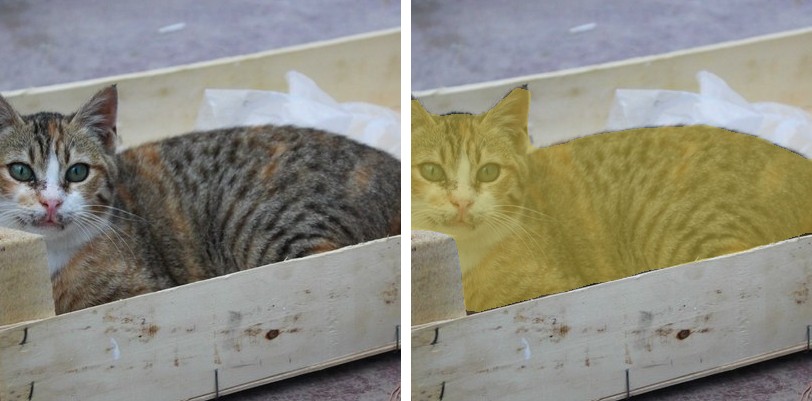
Each figure is the original image beside the predicted segmentation overlaid on it.
import keras
import numpy as np
from PIL import Image
from kerasformers.models.mobilevit import (
    MobileViTImageProcessor, MobileViTSemanticSegment,
)

model = MobileViTSemanticSegment.from_weights("mobilevit_s_deeplabv3")
processor = MobileViTImageProcessor.from_weights("mobilevit_s_deeplabv3")

image = Image.open("assets/data/hf_cat_2.jpg").convert("RGB")

# The processor resizes the shortest edge then center-crops, so the model only
# sees the middle of the frame. Post-process to that region, not the full image.
w, h = image.size
scale = processor.size["shortest_edge"] / min(w, h)
cw, ch = processor.crop_size["width"], processor.crop_size["height"]
left, top = (round(w * scale) - cw) // 2, (round(h * scale) - ch) // 2
box = (round(left / scale), round(top / scale),
       round((left + cw) / scale), round((top + ch) / scale))
seen = image.crop(box)

output = model(processor(image)["pixel_values"], training=False)
# output: (1, 32, 32, 21)   stride-16 logits

result = processor.post_process_semantic_segmentation(
    output, target_size=(seen.height, seen.width)
)
seg = np.asarray(keras.ops.convert_to_numpy(result["segmentation"]))

for cid, name in zip(result["unique_classes"], result["class_names"]):
    print(f"{name:14s} {int((seg == int(cid)).sum())} px")
This is the image apple/deeplabv3-mobilevit-small uses on its model card. Both cats
come back as a single cat region, not two: semantic segmentation labels pixels, not
instances. For separate per-animal masks you need an instance or panoptic model such as
Mask2Former or EoMT.
The center crop is the thing to watch here. For this 640x480 image the
processor resizes the shortest edge to 544, then keeps only the middle
512x512, discarding roughly 29% of the width. Passing the original
(height, width) as target_size stretches that crop back across the whole frame
and every region lands visibly off-target. Cropping to box first, as above, keeps
the overlay aligned with what the network actually saw.
Set do_center_crop=False and resize to a square yourself if you would rather the
model see the entire frame, at the cost of distorting the aspect ratio.
Batch Processing Multiple Images
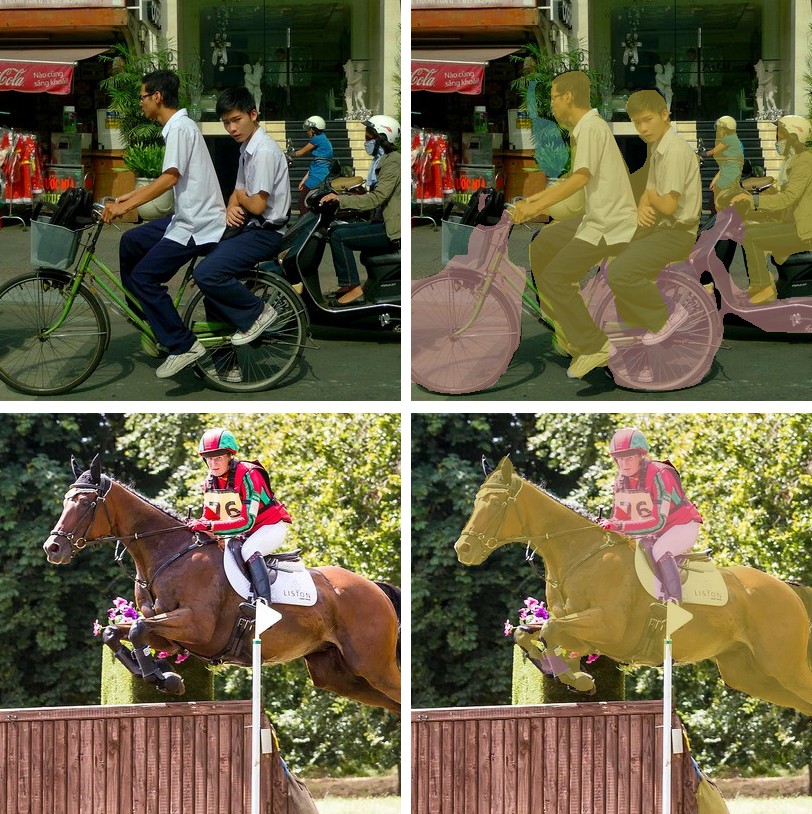
import keras
import numpy as np
from PIL import Image
from kerasformers.models.mobilevit import (
    MobileViTImageProcessor, MobileViTSemanticSegment,
)

model = MobileViTSemanticSegment.from_weights("mobilevit_s_deeplabv3")
processor = MobileViTImageProcessor.from_weights("mobilevit_s_deeplabv3")


def seen_box(image):
    """The region the center crop keeps, in original coordinates."""
    w, h = image.size
    scale = processor.size["shortest_edge"] / min(w, h)
    cw, ch = processor.crop_size["width"], processor.crop_size["height"]
    left, top = (round(w * scale) - cw) // 2, (round(h * scale) - ch) // 2
    return (round(left / scale), round(top / scale),
            round((left + cw) / scale), round((top + ch) / scale))


paths = ["assets/data/coco_bicycles.jpg", "assets/data/coco_horse_jump.jpg"]
images = [Image.open(p).convert("RGB") for p in paths]

outputs = model(processor(paths)["pixel_values"], training=False)   # (2, 32, 32, 21)

for path, image, logits in zip(paths, images, outputs):
    seen = image.crop(seen_box(image))
    result = processor.post_process_semantic_segmentation(
        logits[None], target_size=(seen.height, seen.width)
    )
    seg = np.asarray(keras.ops.convert_to_numpy(result["segmentation"]))
    print(f"\n{path}")
    for cid, name in zip(result["unique_classes"], result["class_names"]):
        print(f"  {name:12s} {int((seg == int(cid)).sum())} px")
assets/data/coco_bicycles.jpg
  background   86924 px
  person       41345 px
  bicycle      30648 px
  potted plant 1884 px

assets/data/coco_horse_jump.jpg
  background   111740 px
  horse        39652 px
  person       9409 px
Between them these two exercise five VOC classes: person, bicycle, potted plant,
and horse cleanly separated from its rider. Every image is resized to the same square,
so stacking is always safe.
Input Resolution
MobileViT is Functional, so the input shape is fixed at construction, and the model and
processor must agree. from_weights on both handles it:
| task | model builds at | processor emits |
|---|---|---|
classification (*_cvnets_in1k) |
256 | 288 resize, 256 crop |
segmentation (*_deeplabv3) |
512 | 544 resize, 512 crop |
These are the reference values, and the resize target is always the crop plus 32. To run at another size, set it on both:
model = MobileViTSemanticSegment.from_weights("mobilevit_s_deeplabv3", image_size=384)
processor = MobileViTImageProcessor(
    size={"shortest_edge": 416}, crop_size={"height": 384, "width": 384},
)
Data Format
Both the model and the processor support channels_last and channels_first.
| How it picks the format | |
|---|---|
| Processors | A data_format kwarg, per instance. None (the default) resolves to keras.config.image_data_format(). |
| Models | Read keras.config.image_data_format() when they are constructed. There is no data_format argument. |
post_process_semantic_segmentation also takes data_format, since it needs to know
which axis holds the classes. It always returns (H, W).
Loading Fine-tuned and Community Weights
Any Hugging Face repo whose model_type is "mobilevit" loads with the hf: prefix.
from kerasformers.models.mobilevit import MobileViTSemanticSegment

model = MobileViTSemanticSegment.from_weights("hf:apple/deeplabv3-mobilevit-small")
model = MobileViTSemanticSegment.from_weights("hf:<user>/mobilevit-finetuned-on-my-data")

# Architecture only, randomly initialized
model = MobileViTSemanticSegment.from_weights("mobilevit_s_deeplabv3", load_weights=False)
All four model classes accept hf:, as does MobileViTImageProcessor.
See also MobileViTV2 for the separable-attention successor.