OWLv2
from_weights(...).
OWLv2 keeps OWL-ViT's dual-tower skeleton and per-patch detection head, and scales it with self-training on web image-text pairs. It adds an objectness head, a learned "is this patch an object at all" score that is independent of the text queries, which improves ranking when several queries compete for the same region.
It also changes preprocessing in a way that matters at the API level: OWLv2 pads images to a square before resizing, where OWL-ViT resizes directly. That affects how you call the post-processor, see Target Sizes.
Paper: Scaling Open-Vocabulary Object Detection
API
Owlv2Detect
Owlv2Detect(vision_image_size, vision_patch_size, vision_hidden_dim,
            vision_intermediate_size, vision_num_layers, vision_num_heads,
            text_hidden_dim, text_intermediate_size, text_num_heads,
            projection_dim, text_num_layers=12, ..., name="Owlv2Detect")
The detector: vision and text encoders plus per-patch class, box, and objectness heads. This is the class for open-vocabulary detection.
The architecture arguments are all filled in by from_weights from the variant config.
Call model({"input_ids": ..., "pixel_values": ...}). Returns a dict whose
main entries are:
- logits (
(B, num_patches, num_queries)): similarity of each patch to each text query. - objectness_logits (
(B, num_patches)): query-independent objectness score. - pred_boxes (
(B, num_patches, 4)): normalized(cx, cy, w, h)in[0, 1].
Owlv2Model
The vision and text encoders without detection heads, returning image_embeds and
text_embeds.
Owlv2VisionModel / Owlv2TextModel
Owlv2VisionModel(vision_image_size, vision_patch_size, vision_hidden_dim,
                 vision_intermediate_size, vision_num_layers, vision_num_heads,
                 image_size=None, input_tensor=None, name="Owlv2VisionModel")

Owlv2TextModel(text_hidden_dim, text_intermediate_size, text_num_heads,
               text_num_layers=12, text_max_position_embeddings=16,
               text_vocab_size=49408, text_input_shape=None,
               input_tensor=None, name="Owlv2TextModel")
Either tower on its own.
Preprocessing
Owlv2Processor
Owlv2Processor(size=None, resample="bicubic", do_rescale=True,
               rescale_factor=1/255, do_pad=True, do_normalize=True,
               image_mean=(0.48145466, 0.4578275, 0.40821073),
               image_std=(0.26862954, 0.26130258, 0.27577711), ...)
Tokenizer and image processor behind one callable. Call
processor(text=..., images=...), where text is a list of query lists, one per image.
Returns a dict with input_ids, attention_mask, and pixel_values.
Owlv2ImageProcessor
Owlv2ImageProcessor(size=None, resample="bicubic", do_rescale=True,
                    rescale_factor=1/255, do_pad=True, do_normalize=True,
                    image_mean=None, image_std=None, return_tensor=True,
                    data_format=None)
Pads to a square, resizes to the variant's resolution, rescales, and normalizes with CLIP statistics.
- do_pad (
bool, optional, defaults toTrue): pad to a square before resizing. This is the difference from OWL-ViT and it changes the coordinate frame of the predicted boxes.
post_process_object_detection
image_processor.post_process_object_detection(outputs, threshold=0.1,
                                              target_sizes=None, text_labels=None)
Sigmoids the similarity scores, keeps candidates above threshold, and scales boxes to
target_sizes. Returns a list with one dict per image holding scores,
labels, boxes, and text_labels when queries were supplied.
Target Sizes: the padding trap
Because OWLv2 pads to a square before resizing, predicted boxes are normalized to the
padded square, not to the original image. Passing the natural (height, width)
therefore squashes one axis.
Pass max(h, w) for both dimensions instead:
side = max(image.height, image.width)
results = image_processor.post_process_object_detection(
    output, threshold=0.15, target_sizes=[(side, side)], text_labels=[prompts],
)[0]
The difference is not subtle. On a 640×480 image, checking the same two remote controls against a closed-set detector's boxes:
target_sizes=(480, 640)  ->  [38, 54, 175, 89]    [338, 57, 371, 142]   wrong
target_sizes=(640, 640)  ->  [38, 73, 175, 119]   [338, 77, 371, 190]   correct
ground truth             ->  [40, 73, 176, 118]   [334, 77, 372, 188]
The padded-square version lands within a pixel or two; the natural-size version compresses everything vertically. OWL-ViT is not affected, since it resizes without padding.
Model Variants
| Variant id | Vision tower | Image size | HF original |
|---|---|---|---|
owlv2-base-patch16 |
ViT-B/16, 12L, 768 hidden | 960×960 | google/owlv2-base-patch16 |
owlv2-base-patch16-ensemble |
ViT-B/16, 12L, 768 hidden | 960×960 | google/owlv2-base-patch16-ensemble |
owlv2-base-patch16-finetuned |
ViT-B/16, 12L, 768 hidden | 960×960 | google/owlv2-base-patch16-finetuned |
owlv2-large-patch14 |
ViT-L/14, 24L, 1024 hidden | 1008×1008 | google/owlv2-large-patch14 |
owlv2-large-patch14-ensemble |
ViT-L/14, 24L, 1024 hidden | 1008×1008 | google/owlv2-large-patch14-ensemble |
owlv2-large-patch14-finetuned |
ViT-L/14, 24L, 1024 hidden | 1008×1008 | google/owlv2-large-patch14-finetuned |
The -ensemble variants come from an ensemble of self-training runs and are usually the
better default; -finetuned adds supervised detection fine-tuning. The text tower is
fixed across variants: 12 layers, vocab 49408, max query length 16.
Basic Usage: Open-Vocabulary Detection
from PIL import Image
from kerasformers.models.owlv2 import (
    Owlv2Detect, Owlv2ImageProcessor, Owlv2Processor,
)

model = Owlv2Detect.from_weights("owlv2-base-patch16")
processor = Owlv2Processor.from_weights("owlv2-base-patch16")
image_processor = Owlv2ImageProcessor()

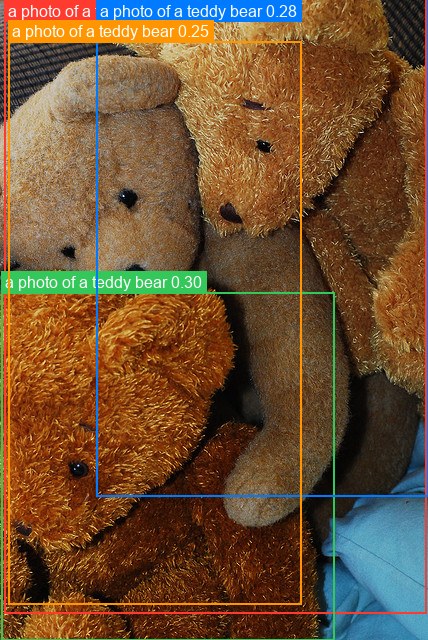
image = Image.open("assets/data/coco_teddy_bears.jpg").convert("RGB")
prompts = [
    "a photo of a teddy bear",
    "a photo of a real bear",
    "a photo of a laptop",
]

inputs = processor(text=[prompts], images=image)
output = model({
    "input_ids": inputs["input_ids"],
    "pixel_values": inputs["pixel_values"],
})

# OWLv2 pads to a square, so scale by max(h, w), not (h, w).
side = max(image.height, image.width)
results = image_processor.post_process_object_detection(
    output, threshold=0.15,
    target_sizes=[(side, side)],
    text_labels=[prompts],
)[0]

detections = sorted(
    zip(results["scores"], results["text_labels"], results["boxes"]),
    key=lambda d: -float(d[0]),
)
for score, name, box in detections:
    print(f"{name:26s} {float(score):.3f}  {[round(float(v)) for v in box]}")
a photo of a teddy bear    0.305  [4, -10, 426, 613]
a photo of a teddy bear    0.304  [1, 292, 334, 640]
a photo of a teddy bear    0.277  [96, -10, 428, 496]
a photo of a teddy bear    0.248  [8, 41, 301, 604]
Four overlapping bears, and neither the "real bear" nor the "laptop" query fires. The
distinction between a teddy bear and a real bear is exactly the kind of thing a
closed-set COCO detector cannot express, since it only has one teddy bear class.
Scores sit lower than OWL-ViT's on this image because the bears overlap heavily and
each candidate patch splits similarity across several instances. Boxes can extend past
the image bounds (-10 above); clip if you need strict bounds.
Batch Processing Multiple Images
Pass one query list per image, and one target_sizes entry per image, each squared:
from PIL import Image
from kerasformers.models.owlv2 import (
    Owlv2Detect, Owlv2ImageProcessor, Owlv2Processor,
)

model = Owlv2Detect.from_weights("owlv2-base-patch16")
processor = Owlv2Processor.from_weights("owlv2-base-patch16")
image_processor = Owlv2ImageProcessor()

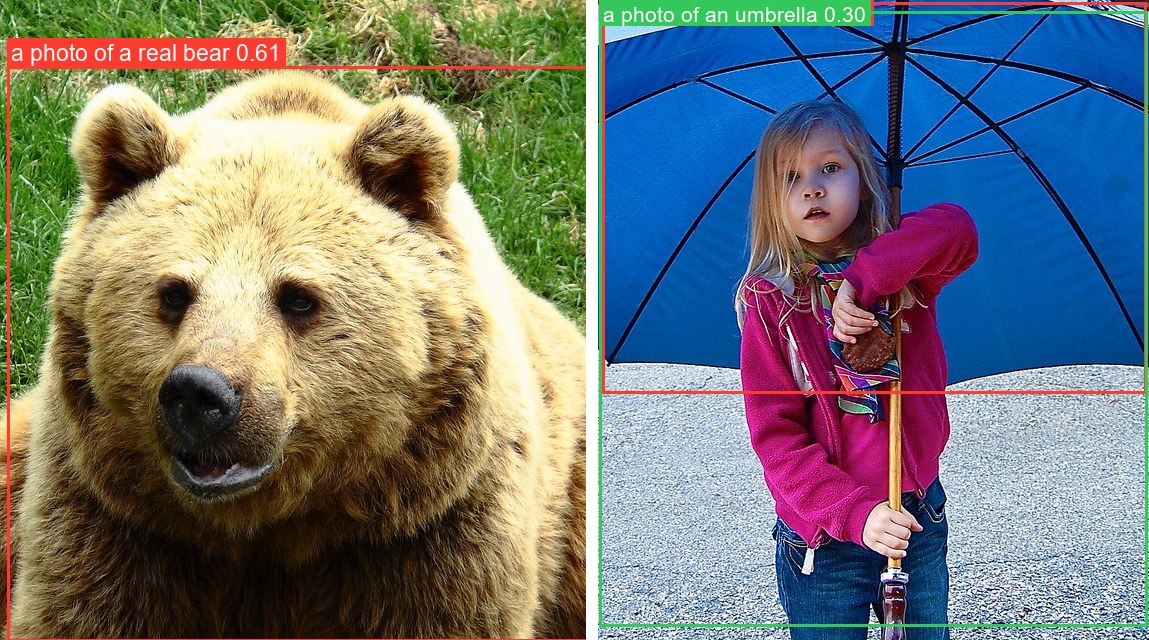
paths = ["assets/data/coco_bear.jpg", "assets/data/coco_girl_umbrella.jpg"]
images = [Image.open(p).convert("RGB") for p in paths]
prompts = [["a photo of a real bear", "a photo of a teddy bear"],
           ["a photo of an umbrella", "a photo of a person"]]

inputs = processor(text=prompts, images=images)
# input_ids (4, 16) -> 2 images x 2 queries;  pixel_values (2, 960, 960, 3)
output = model({
    "input_ids": inputs["input_ids"],
    "pixel_values": inputs["pixel_values"],
})

sizes = [(max(im.height, im.width),) * 2 for im in images]
results = image_processor.post_process_object_detection(
    output, threshold=0.15, target_sizes=sizes, text_labels=prompts,
)

for path, result in zip(paths, results):
    print(f"\n{path}")
    detections = sorted(
        zip(result["scores"], result["text_labels"], result["boxes"]),
        key=lambda d: -float(d[0]),
    )
    for score, name, box in detections:
        print(f"  {name:26s} {float(score):.3f}  {[round(float(v)) for v in box]}")
assets/data/coco_bear.jpg
  a photo of a real bear     0.614  [7, 66, 588, 641]

assets/data/coco_girl_umbrella.jpg
  a photo of an umbrella     0.405  [4, 2, 548, 393]
  a photo of an umbrella     0.301  [1, 11, 549, 626]
The first image resolves to the real bear and not the teddy bear, the reverse of the single-image example above. That contrast is only expressible because the label set is an argument.
input_ids is (num_images × num_queries, max_length), flattened across images, which
is why the count is 4 for two images with two queries each.
Data Format
Both the models and the processors support channels_last and channels_first.
Neither is hard-coded to a layout.
| How it picks the format | |
|---|---|
| Processors | A data_format kwarg, per instance. None (the default) resolves to keras.config.image_data_format(). |
| Models | Read keras.config.image_data_format() when they are constructed. There is no data_format argument. |
Overriding the processor only
Owlv2ImageProcessor(data_format="channels_last")("photo.jpg")
# {"pixel_values": (1, 960, 960, 3)}

Owlv2ImageProcessor(data_format="channels_first")("photo.jpg")
# {"pixel_values": (1, 3, 960, 960)}
Switching the whole pipeline
import keras

keras.config.set_image_data_format("channels_first")

model = Owlv2Detect.from_weights("owlv2-base-patch16")
processor = Owlv2Processor.from_weights("owlv2-base-patch16")
Detections are the same under either layout. Set it once at the top of a script, since already-built models keep the layout they were constructed with.
The post-processor emits xyxy pixel boxes and query indices, so it takes no
data_format kwarg.
Loading Fine-tuned and Community Weights
Any Hugging Face repo whose model_type is "owlv2" loads directly with the hf:
prefix.
from kerasformers.models.owlv2 import Owlv2Detect

# The original Google checkpoints
model = Owlv2Detect.from_weights("hf:google/owlv2-base-patch16-ensemble")

# Somebody's fine-tune
model = Owlv2Detect.from_weights("hf:<user>/owlv2-finetuned-on-my-data")

# Architecture only, randomly initialized
model = Owlv2Detect.from_weights("owlv2-base-patch16", load_weights=False)
No shape arguments are needed. The architecture is read from the repo's config.json.
All five model classes accept hf:, as do Owlv2Processor and Owlv2ImageProcessor:
Loading hf:google/owlv2-base-patch16 and the owlv2-base-patch16 release variant
produces identical outputs, since they are the same checkpoint by two routes.