OneFormer
from_weights(...).
MaskFormer and Mask2Former are universal in architecture but not in training: each checkpoint is trained for one task, which is why you pick between -instance, -panoptic and -semantic weights.
OneFormer removes that split. It trains one model on all three tasks jointly, conditioned on a text token that names the task. At inference you pass task="semantic", "instance" or "panoptic" to the same weights and the model behaves accordingly. That token is why the processor is a composite of an image processor and a tokenizer, unlike every other segmenter here.
Paper: OneFormer: One Transformer to Rule Universal Image Segmentation
API
OneFormerUniversalSegment
Swin backbone, pixel decoder, and the task-conditioned transformer decoder. This is the class for segmentation.
Architecture arguments are filled in by from_weights from the variant config.
Call model(inputs) with the processor's output dict, which must include
task_inputs. Returns a dict:
- class_queries_logits (
(B, num_queries, num_classes + 1)): one class distribution per query. - masks_queries_logits (
(B, num_queries, H/4, W/4)): one binary mask logit map per query.
OneFormerModel
OneFormerModel(backbone_embed_dim=96, backbone_depths=(2, 2, 6, 2),
               backbone_num_heads=(3, 6, 12, 24), backbone_window_size=7,
               hidden_dim=256, mask_feature_size=256, encoder_num_layers=6,
               ..., name="OneFormerModel")
The backbone and pixel decoder without the query heads.
Preprocessing
OneFormerProcessor
OneFormerProcessor(variant=None, target_size=None, task_seq_len=77,
                   tokenizer=None, hf_id=None, tokenizer_file=None,
                   image_processor=None)
An OneFormerImageProcessor and an OneFormerTokenizer behind one callable. The
tokenizer exists to encode the task string.
Parameters
- variant (
str, optional): release variant, used to pick the matchingtokenizer.jsonand resolution. - target_size (
int, optional): square canvas edge. - task_seq_len (
int, optional, defaults to77): padded length of the task token sequence. - tokenizer / image_processor (optional): pre-built components.
Call processor(images=..., task="panoptic"). Returns a dict:
- pixel_values (
(B, S, S, 3)): the padded square canvas. - task_inputs (
(B, 77)): the tokenized task prompt.
The keyword is
task, nottask_inputs.task_inputsis what comes out of the processor;taskis what you pass in. Accepted values are"semantic","instance"and"panoptic".
post_process_panoptic_segmentation / post_process_semantic_segmentation
processor.post_process_panoptic_segmentation(outputs, target_size, threshold=0.8, ...)
processor.post_process_semantic_segmentation(outputs, target_sizes=None, label_names=None)
Same signatures and return shapes as MaskFormer's, which
they delegate to since the output format is identical. Note the panoptic method takes
singular target_size and the semantic one plural target_sizes.
label_names defaults to the label set matching the head width, so the ADE20K variants
resolve ADE names and the COCO one resolves COCO panoptic names.
Model Variants
| Variant id | Backbone | Training set | Classes |
|---|---|---|---|
oneformer_ade20k_swin_tiny |
Swin-Tiny | ADE20K | 150 |
oneformer_ade20k_swin_large |
Swin-Large | ADE20K | 150 |
oneformer_coco_swin_large |
Swin-Large | COCO | 133 |
oneformer_cityscapes_swin_large |
Swin-Large | Cityscapes | 19 |
Each checkpoint handles all three tasks; the training set determines the vocabulary, not the task.
Basic Usage: Universal Segmentation

Each figure is the original image beside the predicted segmentation overlaid on it.
import keras
import numpy as np
import torch
from PIL import Image
from kerasformers.models.oneformer import (
    OneFormerProcessor, OneFormerUniversalSegment,
)

model = OneFormerUniversalSegment.from_weights("oneformer_ade20k_swin_tiny")
processor = OneFormerProcessor.from_weights("oneformer_ade20k_swin_tiny")

image = Image.open("assets/data/coco_office.jpg").convert("RGB")

# The task is an argument, not a property of the checkpoint.
inputs = processor(images=image, task="panoptic")
# inputs["pixel_values"]: (1, 512, 512, 3)
# inputs["task_inputs"]:  (1, 77)

with torch.no_grad():
    output = model(inputs)

result = processor.post_process_panoptic_segmentation(
    output, target_size=(image.height, image.width)
)
seg = np.asarray(keras.ops.convert_to_numpy(result["segmentation"]))

for s in result["segments_info"]:
    print(f"{s['label_name']:16s} {int((seg == s['id']).sum())} px  score {s['score']:.3f}")
Switching task needs no new weights:
inputs = processor(images=image, task="semantic")
with torch.no_grad():
    output = model(inputs)
maps = processor.post_process_semantic_segmentation(
    output, target_sizes=[(image.height, image.width)]
)
Batch Processing Multiple Images
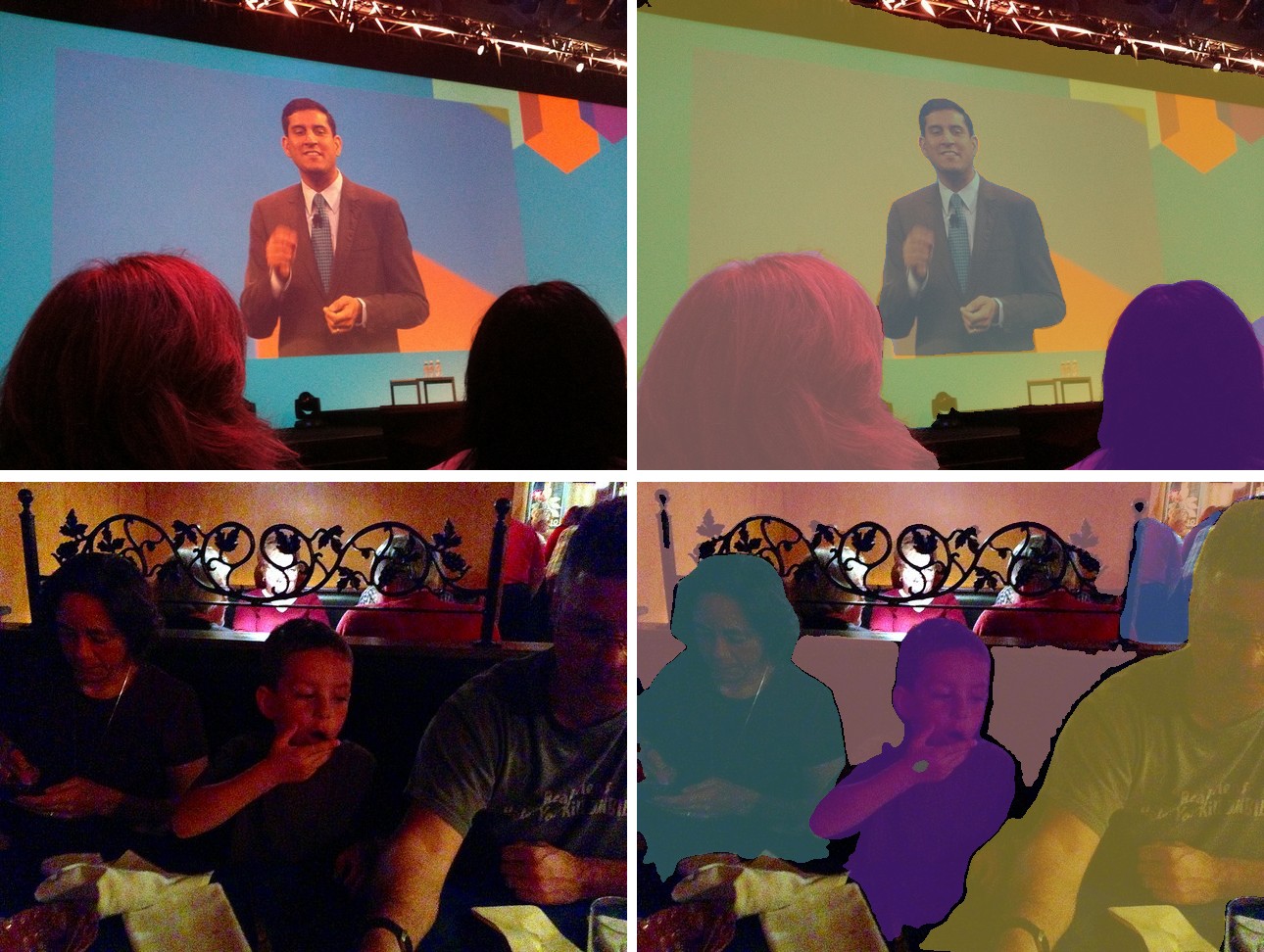
Post-process one image at a time, since each has its own target size:
import keras
import numpy as np
import torch
from PIL import Image
from kerasformers.models.oneformer import (
    OneFormerProcessor, OneFormerUniversalSegment,
)

model = OneFormerUniversalSegment.from_weights("oneformer_ade20k_swin_tiny")
processor = OneFormerProcessor.from_weights("oneformer_ade20k_swin_tiny")

paths = ["assets/data/coco_presentation.jpg", "assets/data/coco_movie_snacks.jpg"]

for path in paths:
    image = Image.open(path).convert("RGB")
    inputs = processor(images=image, task="panoptic")
    with torch.no_grad():
        output = model(inputs)
    result = processor.post_process_panoptic_segmentation(
        output, target_size=(image.height, image.width)
    )
    seg = np.asarray(keras.ops.convert_to_numpy(result["segmentation"]))
    print(f"\n{path}")
    for s in result["segments_info"]:
        print(f"  {s['label_name']:14s} {int((seg == s['id']).sum())} px")
assets/data/coco_presentation.jpg
  wall           165124 px
  person         50825 px
  person         32068 px
  person         29041 px
  person         243 px

assets/data/coco_movie_snacks.jpg
  person         83436 px
  wall           53731 px
  person         50572 px
  person         37063 px
  person         8181 px
  windowpane     3580 px
Four separate person segments in the first image and four in the second, each with
its own id, including one at 243 pixels. ADE20K has no things: / stuff: prefix,
unlike COCO panoptic, so names are bare.
Data Format
Both the model and the processor support channels_last and channels_first.
| How it picks the format | |
|---|---|
| Processors | A data_format kwarg on the image processor. None (the default) resolves to keras.config.image_data_format(). |
| Models | Read keras.config.image_data_format() when they are constructed. There is no data_format argument. |
The post-processors emit (H, W) label maps and segment metadata, so they take no
data_format kwarg.
Loading Fine-tuned and Community Weights
Any Hugging Face repo whose model_type is "oneformer" loads with the hf: prefix.
from kerasformers.models.oneformer import OneFormerUniversalSegment

model = OneFormerUniversalSegment.from_weights("hf:shi-labs/oneformer_ade20k_swin_tiny")
model = OneFormerUniversalSegment.from_weights("hf:<user>/oneformer-finetuned")

# Architecture only, randomly initialized
model = OneFormerUniversalSegment.from_weights(
    "oneformer_ade20k_swin_tiny", load_weights=False,
)
OneFormerProcessor and OneFormerTokenizer accept hf: too, so the task tokenizer
comes from the same repo.
See also Mask2Former, whose architecture this builds on, and EoMT, which strips the decoder out entirely.