DETR
from_weights(...).
DETR (DEtection TRansformer) treats object detection as direct set prediction. A ResNet backbone produces a feature map, a transformer encoder-decoder attends over it with a fixed set of learned object queries, and each query emits one class and one box. Training uses a bipartite (Hungarian) matching loss, so every ground-truth object is assigned exactly one query.
That framing removes the hand-tuned pieces conventional detectors need: no anchor boxes, no non-maximum suppression, no post-hoc duplicate filtering. The number of queries caps how many objects one image can yield, which is why the default of 100 is generous for COCO scenes.
Paper: End-to-End Object Detection with Transformers
API
DETRDetect
DETRDetect(backbone_variant="ResNet50", hidden_dim=256, num_heads=8,
           num_encoder_layers=6, num_decoder_layers=6, dim_feedforward=2048,
           dropout_rate=0.1, num_queries=100, num_classes=92, image_size=800,
           input_tensor=None, name="DETRDetect")
The detection model: backbone, transformer, and the class and box heads. This is the class for object detection.
Parameters
- backbone_variant (
str, optional, defaults to"ResNet50"): CNN backbone,"ResNet50"or"ResNet101". - hidden_dim (
int, optional, defaults to256): transformer width, thed_modelof the HF config. - num_heads (
int, optional, defaults to8): attention heads. - num_encoder_layers (
int, optional, defaults to6): encoder depth. - num_decoder_layers (
int, optional, defaults to6): decoder depth. - dim_feedforward (
int, optional, defaults to2048): FFN inner dimension. - dropout_rate (
float, optional, defaults to0.1): dropout, active only during training. - num_queries (
int, optional, defaults to100): learned object queries, the hard ceiling on detections per image. - num_classes (
int, optional, defaults to92): COCO's 91 classes plus the "no object" class. - image_size (
int, optional, defaults to800): input resolution the model is built for. - input_tensor (
dict, optional): pre-existing input tensors to build on. - name (
str, optional, defaults to"DETRDetect"): model name.
Call model(pixel_values, training=False). Returns a dict:
- logits (
(B, num_queries, num_classes)): per-query class logits. - pred_boxes (
(B, num_queries, 4)): normalized(cx, cy, w, h)in[0, 1].
Raw output is one prediction per query, most of them the "no object" class. Run it
through post_process_object_detection to get scored, pixel-space boxes.
DetrModel
DetrModel(backbone_variant="ResNet50", hidden_dim=256, num_heads=8,
          num_encoder_layers=6, num_decoder_layers=6, dim_feedforward=2048,
          dropout_rate=0.1, num_queries=100, image_size=800,
          input_tensor=None, name="DetrModel")
The backbone and transformer without detection heads, ending at the decoder hidden states. Use it when you want DETR features to attach your own head to.
Parameters are identical to DETRDetect, minus num_classes, and
name defaults to "DetrModel".
Returns the decoder's last hidden state, (B, num_queries, hidden_dim).
DETRPanopticSegment
DETRPanopticSegment(backbone_variant="ResNet50", hidden_dim=256, num_heads=8,
                    num_encoder_layers=6, num_decoder_layers=6,
                    dim_feedforward=2048, dropout_rate=0.1, num_queries=100,
                    num_classes=250, image_size=800, input_tensor=None,
                    name="DETRPanopticSegment")
Adds a mask head for panoptic segmentation, predicting a per-query mask alongside the class and box. Needs a panoptic checkpoint: see the panoptic variants below.
Parameters match DETRDetect, except num_classes defaults to
250 (COCO panoptic's things plus stuff) and name defaults to
"DETRPanopticSegment".
Preprocessing
DETRImageProcessor
DETRImageProcessor(size=None, resample="bilinear", do_rescale=True,
                   rescale_factor=1/255, do_normalize=True, image_mean=None,
                   image_std=None, return_tensor=True, data_format=None)
Resizes to a fixed square, rescales to [0, 1], and normalizes with ImageNet
statistics.
Parameters
- size (
dict, optional, defaults to{"height": 800, "width": 800}): target size. - resample (
str, optional, defaults to"bilinear"): resize interpolation. - do_rescale (
bool, optional, defaults toTrue): scale pixels to[0, 1]. - rescale_factor (
float, optional, defaults to1/255): the rescaling factor. - do_normalize (
bool, optional, defaults toTrue): apply mean/std normalization. - image_mean (
tuple, optional, defaults to(0.485, 0.456, 0.406)): per-channel mean. - image_std (
tuple, optional, defaults to(0.229, 0.224, 0.225)): per-channel std. - return_tensor (
bool, optional, defaults toTrue): return backend tensors rather than numpy. - data_format (
str, optional):"channels_last"or"channels_first". Defaults tokeras.config.image_data_format().
Call processor(image) with a path, a PIL image, an array, or a list of any
mix of those. Returns a dict:
- pixel_values (
(B, H, W, 3)): the preprocessed images, in the configured data format.
A list is preprocessed and stacked into one batch, which is always safe here because every image is resized to the same square. See Batch Processing.
post_process_object_detection
processor.post_process_object_detection(outputs, threshold=0.7, target_sizes=None,
                                        label_names=None)
Softmaxes the logits, drops the "no object" class, keeps whatever clears threshold,
and converts boxes to pixel-space (x0, y0, x1, y1) scaled to target_sizes.
- outputs: the
dictreturned by the model. - threshold (
float, optional, defaults to0.7): minimum class probability. - target_sizes (
listof(height, width), optional): original image sizes, one per batch element. - label_names (
listofstr, optional): class names. Defaults to COCO's 91 classes.
Returns a list with one dict per image:
- scores: class probability per kept detection.
- labels: integer class indices.
- label_names: the resolved class names.
- boxes:
(x0, y0, x1, y1)in pixels.
Model Variants
Detection variants for DETRDetect.from_weights:
| Variant id | Backbone | Params | HF original |
|---|---|---|---|
detr-resnet-50 |
ResNet-50 | ~41 M | facebook/detr-resnet-50 |
detr-resnet-101 |
ResNet-101 | ~60 M | facebook/detr-resnet-101 |
Panoptic variants for DETRPanopticSegment.from_weights:
| Variant id | Backbone | HF original |
|---|---|---|
detr-resnet-50-panoptic |
ResNet-50 | facebook/detr-resnet-50-panoptic |
detr-resnet-101-panoptic |
ResNet-101 | facebook/detr-resnet-101-panoptic |
Basic Usage: Object Detection
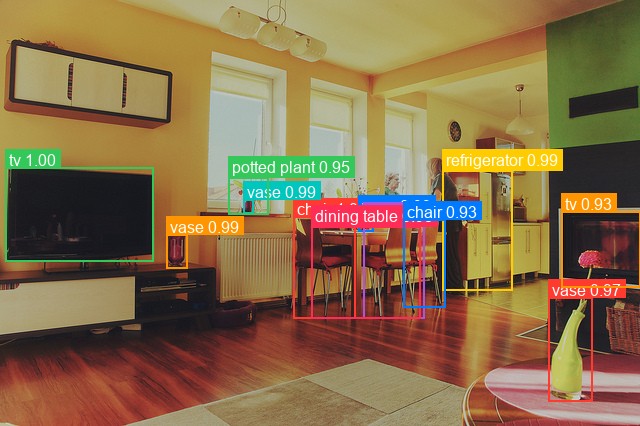
from PIL import Image
from kerasformers.models.detr import DETRDetect, DETRImageProcessor

model = DETRDetect.from_weights("detr-resnet-50")
processor = DETRImageProcessor()

image = Image.open("assets/data/coco_living_room.jpg").convert("RGB")
inputs = processor(image)

output = model(inputs["pixel_values"], training=False)
# output["logits"]:     (1, 100, 92)
# output["pred_boxes"]: (1, 100, 4)

results = processor.post_process_object_detection(
    output, threshold=0.9, target_sizes=[(image.height, image.width)]
)[0]

# Queries come back in the model's own order, so sort by score for readability.
detections = sorted(
    zip(results["scores"], results["label_names"], results["boxes"]),
    key=lambda d: -float(d[0]),
)
for score, name, box in detections:
    print(f"{name:14s} {float(score):.3f}  {[round(float(v)) for v in box]}")
chair          0.999  [293, 216, 355, 318]
tv             0.997  [5, 167, 153, 261]
vase           0.994  [358, 213, 373, 231]
vase           0.992  [166, 234, 187, 268]
chair          0.992  [363, 220, 424, 318]
refrigerator   0.989  [442, 170, 512, 290]
vase           0.986  [243, 199, 253, 213]
dining table   0.985  [311, 226, 420, 318]
vase           0.968  [548, 297, 592, 401]
potted plant   0.954  [228, 177, 268, 214]
chair          0.930  [403, 219, 445, 307]
tv             0.925  [561, 211, 640, 287]
The 0.9 threshold is deliberately high. DETR is confident on clean COCO objects, and
lowering it mostly adds duplicates of what is already found.
Batch Processing Multiple Images
Pass a list of images and one target_sizes entry per image:
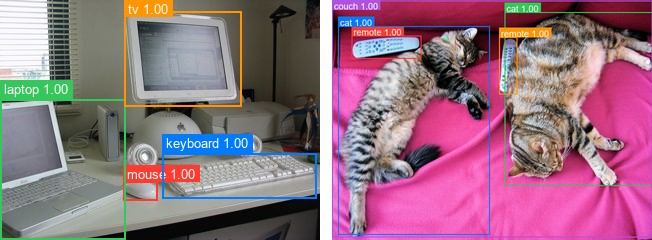
from PIL import Image
from kerasformers.models.detr import DETRDetect, DETRImageProcessor

model = DETRDetect.from_weights("detr-resnet-50")
processor = DETRImageProcessor()

paths = ["assets/data/coco_desk.jpg", "assets/data/coco_cats.jpg"]
images = [Image.open(p).convert("RGB") for p in paths]

inputs = processor(paths)                      # (2, 800, 800, 3)
output = model(inputs["pixel_values"], training=False)   # (2, 100, 92) and (2, 100, 4)

results = processor.post_process_object_detection(
    output, threshold=0.9,
    target_sizes=[(im.height, im.width) for im in images],
)

for path, result in zip(paths, results):
    print(f"\n{path}")
    detections = sorted(
        zip(result["scores"], result["label_names"], result["boxes"]),
        key=lambda d: -float(d[0]),
    )
    for score, name, box in detections:
        print(f"  {name:10s} {float(score):.3f}  {[round(float(v)) for v in box]}")
assets/data/coco_desk.jpg
  mouse      0.999  [123, 181, 157, 200]
  laptop     0.999  [0, 99, 125, 239]
  keyboard   0.998  [162, 153, 316, 198]
  tv         0.998  [124, 11, 241, 106]

assets/data/coco_cats.jpg
  remote     0.999  [39, 71, 178, 117]
  cat        0.998  [345, 24, 640, 371]
  cat        0.998  [12, 52, 315, 469]
  remote     0.996  [334, 74, 370, 188]
  couch      0.996  [0, 1, 640, 474]
Every image is resized to the same square, so stacking is always safe here. Batch results are identical to running the images one at a time.
Panoptic Segmentation
DETRPanopticSegment adds a mask head, predicting a per-query mask alongside the class
and box. It needs one of the panoptic variants, whose head is 251-way (COCO panoptic's
things plus stuff, plus "no object") rather than the detector's 92.
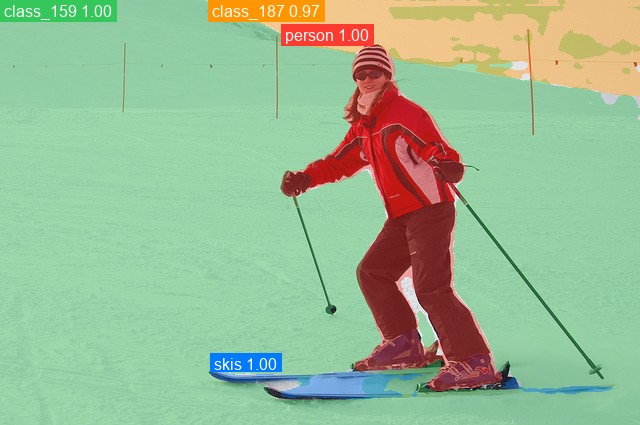
from PIL import Image
from kerasformers.models.detr import DETRImageProcessor, DETRPanopticSegment

model = DETRPanopticSegment.from_weights("detr-resnet-50-panoptic")
processor = DETRImageProcessor()

image = Image.open("assets/data/coco_skier.jpg").convert("RGB")
output = model(processor(image)["pixel_values"], training=False)

# output["logits"]:     (1, 100, 251)
# output["pred_boxes"]: (1, 100, 4)
# output["pred_masks"]: (1, 100, 200, 200)   per-query mask logits
pred_masks is one mask logit map per query, at a lower resolution than the input.
Threshold at zero for a binary mask, and resize to the target size yourself.
Rendering the masks
Since nothing in the library does this for you, here is the overlay above, end to end. The one detail worth copying is the paint order: sort by mask area and draw the largest first, or a big stuff region such as a wall will bury every object inside it.
import keras
import numpy as np
from PIL import Image
from kerasformers.utils.labels_util import COCO_91_CLASSES

PALETTE = [(255, 59, 48), (52, 199, 89), (0, 122, 255), (255, 149, 0),
           (175, 82, 222), (255, 204, 0), (0, 199, 190), (255, 45, 85)]

logits = np.asarray(keras.ops.convert_to_numpy(output["logits"]))[0]     # (100, 251)
masks = np.asarray(keras.ops.convert_to_numpy(output["pred_masks"]))[0]  # (100, 200, 200)

probs = np.exp(logits - logits.max(-1, keepdims=True))
probs /= probs.sum(-1, keepdims=True)
probs = probs[:, :-1]                       # drop the "no object" column
scores, labels = probs.max(-1), probs.argmax(-1)

keep = np.where(scores > 0.85)[0]
keep = keep[np.argsort(-scores[keep])][:8]

W, H = image.size
binary = {q: np.asarray(Image.fromarray(masks[q]).resize((W, H), Image.BILINEAR)) > 0.0
          for q in keep}

canvas = np.asarray(image, dtype="float32").copy()
for q in sorted(keep, key=lambda q: -int(binary[q].sum())):   # largest first
    m = binary[q]
    canvas[m] = 0.6 * canvas[m] + 0.4 * np.array(PALETTE[list(keep).index(q) % 8],
                                                 dtype="float32")

Image.fromarray(canvas.astype("uint8")).save("panoptic.jpg")

for q in keep:
    idx = int(labels[q])
    name = COCO_91_CLASSES[idx] if idx < len(COCO_91_CLASSES) else f"class_{idx}"
    print(f"{name:14s} {scores[q]:.3f}  area {int(binary[q].sum())}")
class_159 is the snow and class_187 the sky. At 218106 pixels the snow is over
seven times the size of the skier, which is exactly why it has to be painted first.
Two things to know before using it:
There is no panoptic post-processor. DETRImageProcessor provides
post_process_object_detection only. That method works on panoptic output and returns
the boxes and scores correctly, but it ignores pred_masks entirely, so stitching
queries into a single panoptic map is left to you.
Pass label_names. The post-processor falls back to COCO's 91 detection names,
which do not cover a 251-class panoptic head, so high-numbered classes come back as
placeholders:
person and skis are COCO detection classes so they resolve, while class_159
(snow) and class_187 (sky) are stuff classes with no name in the default list. The library ships
COCO_91_CLASSES, COCO_80_CLASSES, and PASCAL_VOC_CLASSES in
kerasformers.utils.labels_util, plus COCO_PANOPTIC_THING_IDS and
COCO_PANOPTIC_STUFF_IDS, but no panoptic name list, so supply your own.
Custom Class Names
A model fine-tuned on your own dataset predicts your class indices, not COCO's. Pass
the names through label_names so label_names in the result reads correctly:
MY_CLASSES = ["background", "cat", "dog", "bird"]

results = processor.post_process_object_detection(
    output, threshold=0.7, target_sizes=[(image.height, image.width)],
    label_names=MY_CLASSES,
)
Without it the post-processor falls back to the COCO names, which silently mislabels a
custom model. The integer labels are unaffected either way.
Data Format
Both the models and the processors support channels_last and channels_first.
Neither is hard-coded to a layout, so the whole pipeline runs either way.
They pick the format differently, which is the one thing to keep straight:
| How it picks the format | |
|---|---|
| Processors | A data_format kwarg, per instance. None (the default) resolves to keras.config.image_data_format(). |
| Models | Read keras.config.image_data_format() when they are constructed. There is no data_format argument. |
So a processor can be overridden on its own, while a model follows the global setting in force at build time.
Overriding the processor only
DETRImageProcessor(data_format="channels_last")("photo.jpg")
# {"pixel_values": (1, 800, 800, 3)}

DETRImageProcessor(data_format="channels_first")("photo.jpg")
# {"pixel_values": (1, 3, 800, 800)}
Switching the whole pipeline
Set the global format before constructing the model, and both sides agree:
import keras

keras.config.set_image_data_format("channels_first")

model = DETRDetect.from_weights("detr-resnet-50")
processor = DETRImageProcessor()

inputs = processor(image)
# inputs["pixel_values"] is (1, 3, 800, 800)
output = model(inputs["pixel_values"], training=False)
Detections are the same under either layout. Only the tensor shape changes.
Note that keras.config.set_image_data_format is global state. Set it once at the top
of a script rather than toggling it between calls, since already-built models keep the
layout they were constructed with.
The post-processor is not format-sensitive: it emits xyxy pixel boxes and class
indices, which have no channel axis to interpret, so it takes no data_format kwarg.
Loading Fine-tuned and Community Weights
You are not limited to the official variants above. Any Hugging Face repo whose
model_type is "detr" loads directly with the hf: prefix, including the original
facebook/detr-* checkpoints and arbitrary user fine-tunes.
from kerasformers.models.detr import DETRDetect

# The original Facebook checkpoints
model = DETRDetect.from_weights("hf:facebook/detr-resnet-50")

# Somebody's fine-tune
model = DETRDetect.from_weights("hf:<user>/detr-finetuned-on-my-data")

# Architecture only, randomly initialized
model = DETRDetect.from_weights("detr-resnet-50", load_weights=False)
No shape arguments are needed. The architecture is read from the repo's config.json
and mapped onto the constructor: d_model, encoder_attention_heads,
encoder_layers, decoder_layers, encoder_ffn_dim, and the backbone.
All three model classes accept hf:, as does DETRImageProcessor, so you can pull the
matching preprocessing from the same repo:
Loading hf:facebook/detr-resnet-50 and the detr-resnet-50 release variant produces
identical outputs, since they are the same checkpoint by two routes.