OWL-ViT
from_weights(...).
OWL-ViT detects objects described by free text, with no fixed class list. It starts from a CLIP-style vision and text encoder, then drops CLIP's pooling and attaches a lightweight box head to every patch token. Each patch becomes a detection candidate, scored by cosine similarity against your text queries rather than against a learned classifier.
The practical consequence is that the label set is an argument, not a property of the checkpoint. You can ask for "a mug" and "a knife" on one image and something else on the next, with no retraining.
Paper: Simple Open-Vocabulary Object Detection with Vision Transformers
API
OwlViTDetect
OwlViTDetect(vision_image_size, vision_patch_size, vision_hidden_dim,
             vision_intermediate_size, vision_num_layers, vision_num_heads,
             text_hidden_dim, text_intermediate_size, text_num_heads,
             projection_dim, text_num_layers=12, ...,
             name="OwlViTDetect")
The detector: vision and text encoders plus the per-patch class and box heads. This is the class for open-vocabulary detection.
The architecture arguments are all filled in by from_weights from the variant config,
so you rarely pass them by hand.
Call model({"input_ids": ..., "pixel_values": ...}). Returns a dict whose
main entries are:
- logits (
(B, num_patches, num_queries)): similarity of each patch to each text query. - pred_boxes (
(B, num_patches, 4)): normalized(cx, cy, w, h)in[0, 1].
Note the shape: one candidate per patch, not a fixed query budget. For a 768×768 patch-32 model that is 576 candidates, nearly all of which the threshold drops.
OwlViTModel
The vision and text encoders without detection heads, returning image_embeds and
text_embeds. Use it for CLIP-style embedding work.
OwlViTVisionModel / OwlViTTextModel
OwlViTVisionModel(vision_image_size, vision_patch_size, vision_hidden_dim,
                  vision_intermediate_size, vision_num_layers, vision_num_heads,
                  image_size=None, input_tensor=None, name="OwlViTVisionModel")

OwlViTTextModel(text_hidden_dim, text_intermediate_size, text_num_heads,
                text_num_layers=12, text_max_position_embeddings=16,
                text_vocab_size=49408, text_input_shape=None,
                input_tensor=None, name="OwlViTTextModel")
Either tower on its own, when you only need one side.
Preprocessing
OwlViTProcessor
OwlViTProcessor(size=None, resample="bicubic", do_rescale=True,
                rescale_factor=1/255, do_normalize=True,
                image_mean=(0.48145466, 0.4578275, 0.40821073),
                image_std=(0.26862954, 0.26130258, 0.27577711), ...)
Tokenizer and image processor behind one callable. Call
processor(text=..., images=...), where text is a list of query lists, one per image.
Returns a dict with input_ids, attention_mask, and pixel_values.
OwlViTImageProcessor
OwlViTImageProcessor(size=None, resample="bicubic", do_rescale=True,
                     rescale_factor=1/255, do_normalize=True, image_mean=None,
                     image_std=None, return_tensor=True, data_format=None)
Resizes to the variant's square resolution, rescales, and normalizes with CLIP
statistics. Call processor(images) with a path, PIL image, array, or list.
post_process_object_detection
image_processor.post_process_object_detection(outputs, threshold=0.1,
                                              target_sizes=None, text_labels=None)
Sigmoids the similarity scores, keeps candidates above threshold, and converts boxes
to pixel (x0, y0, x1, y1) scaled to target_sizes.
- text_labels (
listoflistofstr, optional): the query strings per image, used to populatetext_labelsin the result.
Returns a list with one dict per image, holding scores, labels (winning
query index), boxes, and text_labels when queries were supplied.
OWL-ViT resizes without preserving aspect ratio, so
target_sizesis simply the image's(height, width). This differs from OWLv2, which pads to a square first and needsmax(h, w)instead.
Model Variants
| Variant id | Vision tower | Image size | HF original |
|---|---|---|---|
owlvit-base-patch32 |
ViT-B/32, 12L, 768 hidden | 768×768 | google/owlvit-base-patch32 |
owlvit-base-patch16 |
ViT-B/16, 12L, 768 hidden | 768×768 | google/owlvit-base-patch16 |
owlvit-large-patch14 |
ViT-L/14, 24L, 1024 hidden | 840×840 | google/owlvit-large-patch14 |
The text tower is fixed across variants: 12 layers, vocab 49408, max query length 16. Smaller patches mean more candidates and better small-object recall, at more compute.
Basic Usage: Open-Vocabulary Detection
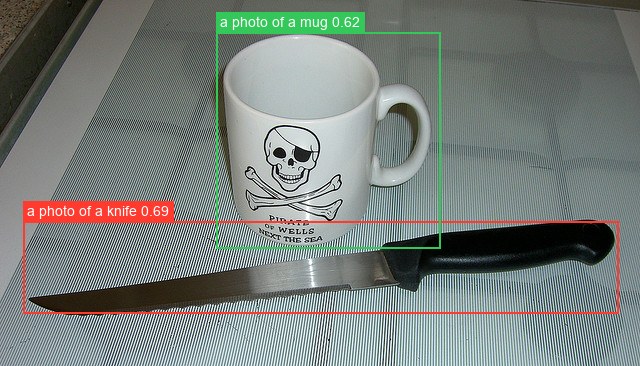
from PIL import Image
from kerasformers.models.owlvit import (
    OwlViTDetect, OwlViTImageProcessor, OwlViTProcessor,
)

model = OwlViTDetect.from_weights("owlvit-base-patch32")
processor = OwlViTProcessor.from_weights("owlvit-base-patch32")
image_processor = OwlViTImageProcessor()

image = Image.open("assets/data/coco_mug_knife.jpg").convert("RGB")
prompts = ["a photo of a mug", "a photo of a knife", "a photo of an apple"]

inputs = processor(text=[prompts], images=image)
output = model({
    "input_ids": inputs["input_ids"],
    "pixel_values": inputs["pixel_values"],
})

results = image_processor.post_process_object_detection(
    output, threshold=0.1,
    target_sizes=[(image.height, image.width)],
    text_labels=[prompts],
)[0]

detections = sorted(
    zip(results["scores"], results["text_labels"], results["boxes"]),
    key=lambda d: -float(d[0]),
)
for score, name, box in detections:
    print(f"{name:22s} {float(score):.3f}  {[round(float(v)) for v in box]}")
The apple query returns nothing, which is the correct answer: absent classes simply score below threshold, no "background" class needed.
Two things about thresholds here. 0.1 is much lower than a closed-set detector's
0.5, because these are cosine similarities passed through a sigmoid rather than
calibrated class probabilities. And prompt phrasing matters: "a photo of a X" is the
CLIP-style template these checkpoints were trained against, and generally beats a bare
noun.
Batch Processing Multiple Images
Pass one query list per image. The prompts do not have to match across images:
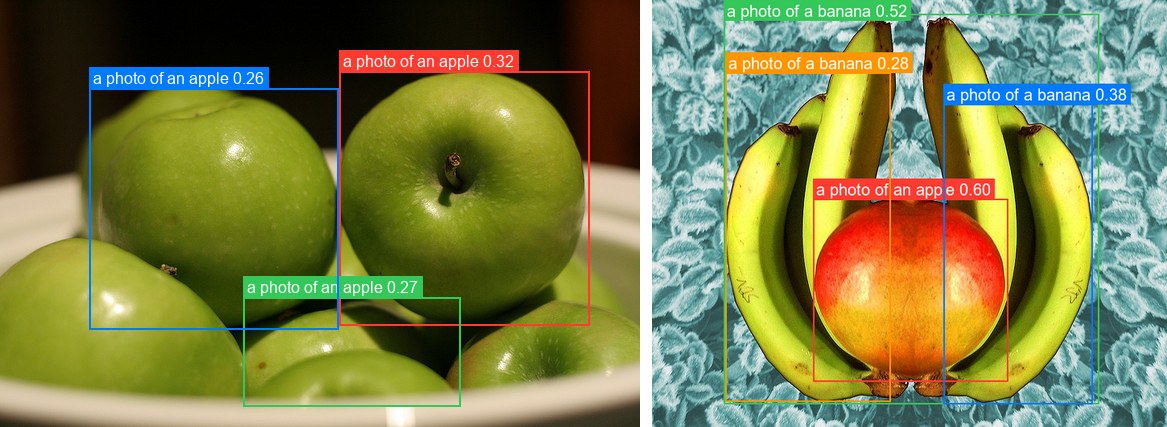
from PIL import Image
from kerasformers.models.owlvit import (
    OwlViTDetect, OwlViTImageProcessor, OwlViTProcessor,
)

model = OwlViTDetect.from_weights("owlvit-base-patch32")
processor = OwlViTProcessor.from_weights("owlvit-base-patch32")
image_processor = OwlViTImageProcessor()

paths = ["assets/data/coco_apples.jpg", "assets/data/coco_bananas.jpg"]
images = [Image.open(p).convert("RGB") for p in paths]
prompts = [["a photo of an apple", "a photo of a banana"],
           ["a photo of a banana", "a photo of an apple"]]

inputs = processor(text=prompts, images=images)
# input_ids (4, 16) -> 2 images x 2 queries;  pixel_values (2, 768, 768, 3)
output = model({
    "input_ids": inputs["input_ids"],
    "pixel_values": inputs["pixel_values"],
})

results = image_processor.post_process_object_detection(
    output, threshold=0.25,
    target_sizes=[(im.height, im.width) for im in images],
    text_labels=prompts,
)

for path, result in zip(paths, results):
    print(f"\n{path}")
    detections = sorted(
        zip(result["scores"], result["text_labels"], result["boxes"]),
        key=lambda d: -float(d[0]),
    )
    for score, name, box in detections:
        print(f"  {name:22s} {float(score):.3f}  {[round(float(v)) for v in box]}")
assets/data/coco_apples.jpg
  a photo of an apple    0.317  [339, 71, 589, 325]
  a photo of an apple    0.267  [243, 297, 460, 406]
  a photo of an apple    0.256  [89, 88, 338, 329]

assets/data/coco_bananas.jpg
  a photo of an apple    0.597  [200, 247, 442, 474]
  a photo of a banana    0.520  [89, 17, 555, 502]
  a photo of a banana    0.376  [362, 129, 547, 502]
  a photo of a banana    0.277  [91, 90, 296, 499]
The threshold is 0.25 here rather than the 0.1 used above: open-vocabulary
scores are uncalibrated similarities, and at 0.1 this pair returns sixteen heavily
overlapping boxes. Raising the bar is the main knob for readable output.
Note the top hit on the second image is an apple, correctly picked out from among the bananas surrounding it.
input_ids is (num_images × num_queries, max_length), flattened across images, which
is why the count is 4 for two images with two queries each. Boxes may extend slightly
past the image bounds (-2 above); clip them if your downstream code needs strict
bounds.
Data Format
Both the models and the processors support channels_last and channels_first.
Neither is hard-coded to a layout.
| How it picks the format | |
|---|---|
| Processors | A data_format kwarg, per instance. None (the default) resolves to keras.config.image_data_format(). |
| Models | Read keras.config.image_data_format() when they are constructed. There is no data_format argument. |
Overriding the processor only
OwlViTImageProcessor(data_format="channels_last")("photo.jpg")
# {"pixel_values": (1, 768, 768, 3)}

OwlViTImageProcessor(data_format="channels_first")("photo.jpg")
# {"pixel_values": (1, 3, 768, 768)}
Switching the whole pipeline
import keras

keras.config.set_image_data_format("channels_first")

model = OwlViTDetect.from_weights("owlvit-base-patch32")
processor = OwlViTProcessor.from_weights("owlvit-base-patch32")
Detections are the same under either layout. Set it once at the top of a script, since already-built models keep the layout they were constructed with.
The post-processor emits xyxy pixel boxes and query indices, so it takes no
data_format kwarg.
Loading Fine-tuned and Community Weights
Any Hugging Face repo whose model_type is "owlvit" loads directly with the hf:
prefix.
from kerasformers.models.owlvit import OwlViTDetect

# The original Google checkpoints
model = OwlViTDetect.from_weights("hf:google/owlvit-base-patch32")

# Somebody's fine-tune
model = OwlViTDetect.from_weights("hf:<user>/owlvit-finetuned-on-my-data")

# Architecture only, randomly initialized
model = OwlViTDetect.from_weights("owlvit-base-patch32", load_weights=False)
No shape arguments are needed. The architecture is read from the repo's config.json.
All five model classes accept hf:, as do OwlViTProcessor and
OwlViTImageProcessor:
Loading hf:google/owlvit-base-patch32 and the owlvit-base-patch32 release variant
produces identical outputs, since they are the same checkpoint by two routes.
See also OWLv2, which scales this recipe with self-training and adds an objectness head.