MobileViTV2
from_weights(...).
MobileViTV2 keeps MobileViT's convolution-and-transformer layout and replaces multi-head self-attention with separable self-attention. Standard attention costs O(k²) in the token count; the separable form computes a single context vector from the keys and broadcasts it, which is O(k). On a mobile CPU that is the difference between a latency budget met and missed.
The other simplification is the size knob. V1 has three hand-designed widths (XXS, XS, S); V2 has one architecture scaled by a single multiplier from 0.5 to 2.0.
Paper: Separable Self-attention for Mobile Vision Transformers
API
MobileViTV2SemanticSegment
MobileViTV2SemanticSegment(multiplier=1.0, image_size=512, output_stride=16,
                           atrous_rates=(6, 12, 18), aspp_out_channels=512,
                           aspp_dropout_prob=0.1, num_classes=21,
                           input_tensor=None,
                           name="MobileViTV2SemanticSegment")
The MobileViTV2 backbone plus a DeepLabV3 ASPP head. This is the class for semantic segmentation.
Parameters
- multiplier (
float, optional, defaults to1.0): width scale. The single size lever, 0.5 to 2.0. - num_classes (
int, optional, defaults to21): Pascal VOC's 20 classes plus background. - image_size (
int, optional, defaults to512): segmentation resolution, not the classification 256. - output_stride (
int, optional, defaults to16): backbone downsampling, reduced from 32 so the head keeps spatial detail. - atrous_rates (
tuple, optional, defaults to(6, 12, 18)): ASPP dilation rates. - aspp_out_channels (
int, optional, defaults to512): ASPP width. - aspp_dropout_prob (
float, optional, defaults to0.1): head dropout, active only during training. - input_tensor (
dict, optional): pre-existing input tensors to build on.
Call model(pixel_values, training=False). Returns a tensor of shape
(B, H/16, W/16, num_classes): per-pixel class logits at the head's stride.
MobileViTV2ImageClassify
MobileViTV2ImageClassify(multiplier=1.0, image_size=256,
                         include_normalization=True,
                         normalization_mode="zero_to_one", num_classes=1000,
                         name="MobileViTV2ImageClassify")
The classification head, at 256 (or 384 for the *_384 variants).
include_normalization=True means the model expects raw [0, 255] pixels.
MobileViTV2Model
The backbone alone, for features.
Preprocessing
MobileViTV2ImageProcessor
MobileViTV2ImageProcessor(size=None, crop_size=None, resample="bilinear",
                          do_resize=True, do_center_crop=True,
                          do_rescale=True, rescale_factor=1/255,
                          do_flip_channel_order=True, return_tensor=True,
                          data_format=None, variant=None)
Identical to MobileViT's processor; the reference ships one class for both generations. Resizes the shortest edge, center-crops, rescales, and flips RGB to BGR. No mean/std normalization.
Prefer
MobileViTV2ImageProcessor.from_weights(variant). Classification trains at 256 (or 384) and segmentation at 512, so the bare constructor is wrong for one of them. Passing the variant resolves the right pair.
post_process_semantic_segmentation
processor.post_process_semantic_segmentation(outputs, target_size=None,
                                             label_names=None, data_format=None)
Takes the per-pixel argmax and upsamples to target_size. Returns a dict with
segmentation (H, W), unique_classes, and class_names.
Model Variants
Segmentation, for MobileViTV2SemanticSegment.from_weights:
| Variant id | Multiplier | Classes | Resolution |
|---|---|---|---|
mobilevitv2_100_deeplabv3 |
1.0 | 21 | 512 |
mobilevitv2_150_deeplabv3 |
1.5 | 21 | 512 |
Classification, for MobileViTV2ImageClassify.from_weights, thirteen variants from
mobilevitv2_050_cvnets_in1k through mobilevitv2_200_cvnets_in22k_ft_in1k_384. The
number is the multiplier times 100; in22k_ft_in1k variants pretrain on ImageNet-22k,
and the _384 suffix marks a 384 rather than 256 resolution.
Basic Usage: Semantic Segmentation
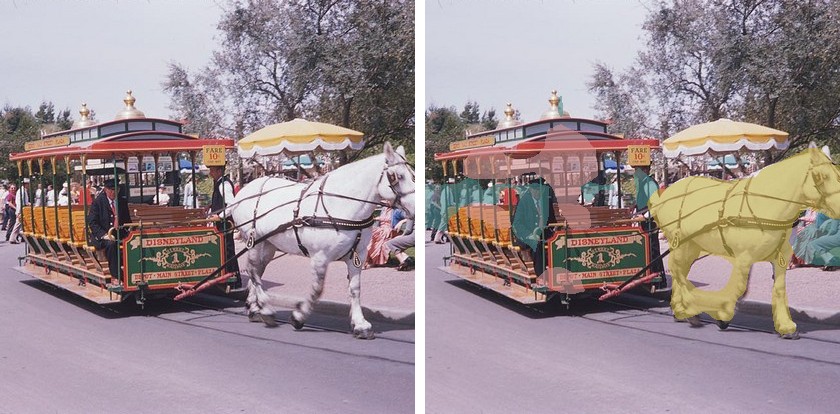
Each figure is the original image beside the predicted segmentation overlaid on it.
import keras
import numpy as np
from PIL import Image
from kerasformers.models.mobilevitv2 import (
    MobileViTV2ImageProcessor, MobileViTV2SemanticSegment,
)

model = MobileViTV2SemanticSegment.from_weights("mobilevitv2_100_deeplabv3")
processor = MobileViTV2ImageProcessor.from_weights("mobilevitv2_100_deeplabv3")

image = Image.open("assets/data/coco_horse_trolley.jpg").convert("RGB")

# The processor resizes the shortest edge then center-crops, so the model only
# sees the middle of the frame. Post-process to that region, not the full image.
w, h = image.size
scale = processor.size["shortest_edge"] / min(w, h)
cw, ch = processor.crop_size["width"], processor.crop_size["height"]
left, top = (round(w * scale) - cw) // 2, (round(h * scale) - ch) // 2
box = (round(left / scale), round(top / scale),
       round((left + cw) / scale), round((top + ch) / scale))
seen = image.crop(box)

output = model(processor(image)["pixel_values"], training=False)
# output: (1, 32, 32, 21)   stride-16 logits

result = processor.post_process_semantic_segmentation(
    output, target_size=(seen.height, seen.width)
)
seg = np.asarray(keras.ops.convert_to_numpy(result["segmentation"]))

for cid, name in zip(result["unique_classes"], result["class_names"]):
    print(f"{name:14s} {int((seg == int(cid)).sum())} px")
The center crop is the thing to watch here. For this 640x440 image the
processor resizes the shortest edge to 544, then keeps only the middle
512x512, discarding roughly 35% of the width. Passing the original
(height, width) as target_size stretches that crop back across the whole frame
and every region lands visibly off-target. Cropping to box first, as above, keeps
the overlay aligned with what the network actually saw.
Set do_center_crop=False and resize to a square yourself if you would rather the
model see the entire frame, at the cost of distorting the aspect ratio.
Batch Processing Multiple Images
import keras
import numpy as np
from PIL import Image
from kerasformers.models.mobilevitv2 import (
    MobileViTV2ImageProcessor, MobileViTV2SemanticSegment,
)

model = MobileViTV2SemanticSegment.from_weights("mobilevitv2_100_deeplabv3")
processor = MobileViTV2ImageProcessor.from_weights("mobilevitv2_100_deeplabv3")


def seen_box(image):
    """The region the center crop keeps, in original coordinates."""
    w, h = image.size
    scale = processor.size["shortest_edge"] / min(w, h)
    cw, ch = processor.crop_size["width"], processor.crop_size["height"]
    left, top = (round(w * scale) - cw) // 2, (round(h * scale) - ch) // 2
    return (round(left / scale), round(top / scale),
            round((left + cw) / scale), round((top + ch) / scale))


paths = ["assets/data/coco_child_umbrella.jpg", "assets/data/coco_parking.jpg"]
images = [Image.open(p).convert("RGB") for p in paths]

outputs = model(processor(paths)["pixel_values"], training=False)   # (2, 32, 32, 21)

for path, image, logits in zip(paths, images, outputs):
    seen = image.crop(seen_box(image))
    result = processor.post_process_semantic_segmentation(
        logits[None], target_size=(seen.height, seen.width)
    )
    seg = np.asarray(keras.ops.convert_to_numpy(result["segmentation"]))
    print(f"\n{path}")
    for cid, name in zip(result["unique_classes"], result["class_names"]):
        print(f"  {name:12s} {int((seg == int(cid)).sum())} px")
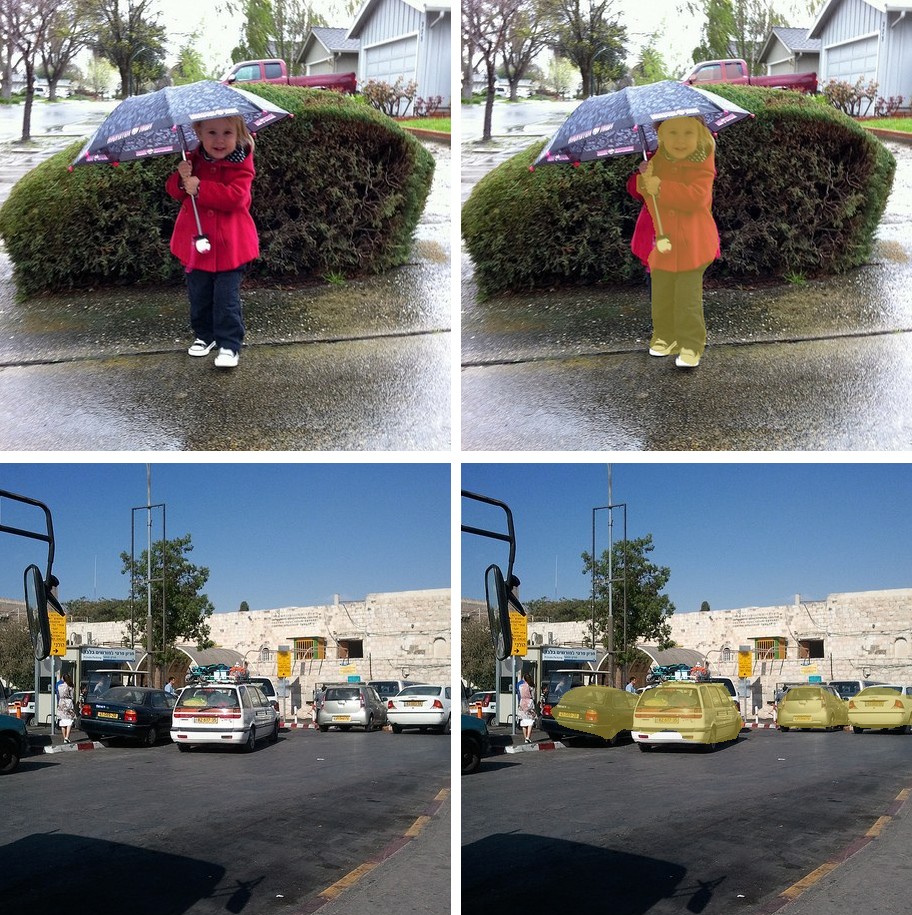
assets/data/coco_child_umbrella.jpg
  background   187762 px
  person       13999 px
  car          739 px

assets/data/coco_parking.jpg
  background   187762 px
  car          13537 px
  person       190 px
Both images resolve cleanly against the VOC vocabulary: the child is person, the
parked cars are car, and a car behind the hedge in the first image is picked up at
980 pixels.
Worth knowing where this vocabulary runs out. VOC has 20 classes, so anything outside
them (an elephant, a laptop, a traffic light) comes back as background, with no
confidence score to signal the model had nothing to say. Reach for
SegFormer's 150 ADE20K classes when the scene contains things VOC never
named.
Input Resolution
MobileViTV2 is Functional, so the input shape is fixed at construction and the model
and processor must agree. from_weights on both handles it:
| task | model builds at | processor emits |
|---|---|---|
| classification | 256 (384 for _384) |
crop + 32 resize |
| segmentation | 512 | 544 resize, 512 crop |
Data Format
Both the model and the processor support channels_last and channels_first.
| How it picks the format | |
|---|---|
| Processors | A data_format kwarg, per instance. None (the default) resolves to keras.config.image_data_format(). |
| Models | Read keras.config.image_data_format() when they are constructed. There is no data_format argument. |
post_process_semantic_segmentation also takes data_format, since it needs to know
which axis holds the classes. It always returns (H, W).
Loading Fine-tuned and Community Weights
Any Hugging Face repo whose model_type is "mobilevitv2" loads with the hf: prefix.
from kerasformers.models.mobilevitv2 import MobileViTV2SemanticSegment

model = MobileViTV2SemanticSegment.from_weights("hf:shehan97/mobilevitv2-1.0-voc-deeplabv3")
model = MobileViTV2SemanticSegment.from_weights("hf:<user>/mobilevitv2-finetuned")

# Architecture only, randomly initialized
model = MobileViTV2SemanticSegment.from_weights(
    "mobilevitv2_100_deeplabv3", load_weights=False,
)
All four model classes accept hf:, as does MobileViTV2ImageProcessor.